

Available models
deepgram/flux supports English, Spanish, French, German, Hindi, Russian, Portuguese, Japanese, Italian, and Dutch. For broader language coverage, use deepgram/nova-3, deepgram/nova-2, azure/fast, assemblyai/universal-streaming, xai/grok-stt, or nvidia/parakeet-v3.Selecting a model
Portal
In the AI Assistants tab, edit your assistant and navigate to the Voice tab. Select your preferred STT model from the Transcription Model dropdown.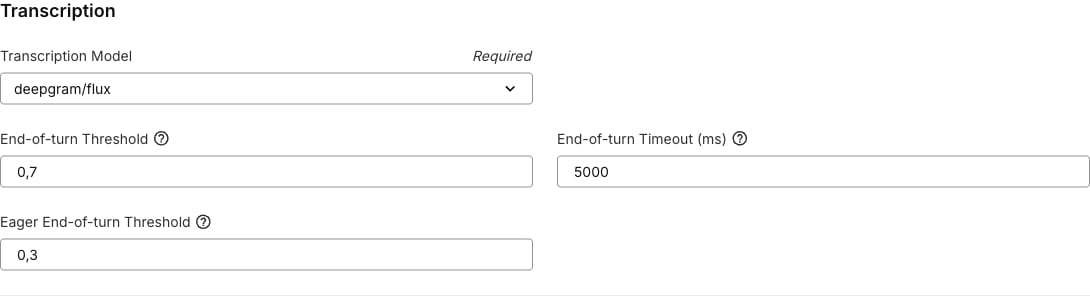
deepgram/fluxsupports explicit languages,auto, andmultifor its supported languages, and applies Flux end-of-turn defaults.- Other Deepgram models enable
smart_formatandnumeralsby default. assemblyai/universal-streamingapplies AssemblyAI turn detection defaults.soniox/stt-rt-v4andsoniox/stt-rt-v5disable endpoint detection by default; term biasing and language hints are left unset.azure/fastdefaults the Azure region tolatency, which auto-selects the closest supported Telnyx-managed region.nvidia/parakeet-v3uses automatic multilingual transcription.cohere/ar-sttdefaults the language toar. Set it toenexplicitly if needed — unlike other models, it does not auto-detect and rejectsauto.reson8/turnsdefaults the language toautofor automatic detection. Setting an explicit language reduces latency.
API
Set thetranscription.model field when creating or updating an assistant:
auto, supported models auto-detect the language:
Languages
Supported language options depend on the selected model.
If your assistant has a language filter set elsewhere in the Voice tab, the Portal only shows transcription models and language choices that are compatible with that language.
Deepgram settings
Deepgram Flux end-of-turn detection
deepgram/flux is optimized for live voice agents. It provides end-of-turn detection so the assistant can start responding as soon as the caller finishes speaking. It also supports eager end-of-turn, which starts large language model (LLM) processing before the caller fully stops speaking to reduce perceived response latency.
When you select deepgram/flux in the Portal, these settings are applied by default:
eager_eot_threshold must be less than or equal to eot_threshold. Setting both thresholds to the same value effectively disables eager end-of-turn behavior because the system waits for final end-of-turn confirmation before starting LLM processing.
The
eager_eot_threshold field is controlled by the FE-eager-eot-threshold Portal feature flag. When that flag is disabled, the Portal hides the field, but API payloads can still include it if your account supports the setting.0.1 seconds for wait time and endpointing plan thresholds.
Keyterm Boost
deepgram/flux and deepgram/nova-3 support keyterm, a comma-separated list of terms to boost during recognition. Use it for product names, customer names, acronyms, or domain-specific vocabulary.
Keyterm Boost also supports dynamic variables. Use variables when boosted terms are caller-specific, such as a customer name, participant names, account name, or product names passed into the assistant at conversation start.
Smart Format and Numerals
For Deepgram models other than Flux, the Portal exposes these settings and enables both by default when you select the model:AssemblyAI settings
assemblyai/universal-streaming supports configurable turn detection. When you select it in the Portal, these defaults are applied:
min_turn_silence must be less than or equal to max_turn_silence.
Soniox settings
Soniox offers two model versions:soniox/stt-rt-v4 and soniox/stt-rt-v5. Both support multilingual streaming transcription with automatic language detection.
Term Biasing
soniox/stt-rt-v4 and soniox/stt-rt-v5 support context, a comma-separated list of terms to boost during recognition. Use it for staff names, building names, product names, or other domain-specific vocabulary.
Term Biasing also supports dynamic variables. Use variables when boosted terms are caller-specific, such as a customer name, participant names, account name, or product names passed into the assistant at conversation start.
Language Hints
language_hints pins recognition to one or more languages at once, as an array of ISO 639-1 codes. Use it when an assistant regularly serves callers in a known set of languages, such as Dutch and French, instead of relying on full auto-detection.
Endpoint detection
Parakeet settings
nvidia/parakeet-v3 supports multilingual transcription with automatic language detection. It does not require provider-specific transcription settings.
Reson8 settings
reson8/turns delivers transcripts per turn of speech: the assistant receives the full transcript of a turn when the caller finishes speaking. Language defaults to auto for automatic detection and can be fixed to one of the 10 supported languages. It does not require provider-specific transcription settings.
Cohere settings
cohere/ar-stt is a self-hosted model for Arabic and English transcription. Unlike other models, it does not auto-detect the language and requires an explicit ar or en — auto (and any other value) is rejected. Omitting language defaults to ar. It does not require provider-specific transcription settings.
Azure settings
azure/fast supports region selection and an optional Azure API key reference.
Common Telnyx-managed regions include
latency, australiaeast, centralindia, eastus, northcentralus, westeurope, and westus2. Additional Azure regions are available when using your own Azure API key.