

This guide uses the GPT-Live SIP contract. Realtime uses different event names, identifiers, endpoints and acceptance payloads; do not mix the two contracts.
For GPT Live inside a Telnyx AI Assistant, including Telnyx-managed tools and delegation settings, use GPT Live voice assistants. This guide covers the separate direct SIP integration.
Overview
With this integration, Telnyx provides the phone number and SIP connection, while OpenAI runs the GPT-Live voice session. Your application receives the incoming-call webhook and attaches to the session over a sideband WebSocket. The media and control paths remain separate:- Call media: Caller ↔ Telnyx ↔ GPT-Live. Your application does not relay audio.
- Application control: OpenAI ↔ your application. Your application accepts or rejects calls, handles tools, initiates approved transfers and monitors the session.
What this guide covers
You will configure:- A Telnyx FQDN SIP Connection to OpenAI.
- TLS for SIP signaling and SRTP for call audio.
- An OpenAI webhook for incoming GPT-Live calls.
- A Python sideband application using Responses delegation.
- An order-lookup tool and an application-controlled human transfer.
Prerequisites
Before you begin, you need:- A Telnyx account.
- A voice-capable Telnyx number.
- An OpenAI project with GPT-Live SIP access.
- Your OpenAI project ID, API key and webhook signing secret.
- A public HTTPS endpoint for OpenAI webhooks.
- Python 3.10 or later.
- An approved SIP or telephone destination for human transfer.
How the call works
When someone calls your Telnyx number:- Telnyx sends a SIP INVITE to OpenAI over TLS and negotiates encrypted media using SRTP.
- OpenAI sends your application a signed
live.transport.incomingwebhook. - Your application verifies the webhook and reads
data.session_id. - Your application accepts or rejects the pending GPT-Live session.
- After accepting, your application attaches to the same session over a sideband WebSocket.
- Telnyx and GPT-Live exchange audio directly while your application handles control events and tools.
- The caller, your application or a transfer destination ends the call.
Keep the OpenAI session ID, webhook ID, Telnyx call identifiers and SIP Call-ID as separate values in your logs. They identify different parts of the call.
Configure OpenAI
Select the project and create an API key
In the OpenAI Platform, select the project with GPT-Live SIP access. Copy its Project > General project ID, including theproj_ prefix. Create an API key under Project > API Keys and store it in your secret manager.
Use the same project for the SIP destination, API key and webhook. A key from another project can produce session_id_not_found even when the webhook arrives successfully. Never put the API key in source control, screenshots or webhook payloads.
Create the incoming-call webhook
Open the project’s webhook settings, create an endpoint, and subscribe tolive.transport.incoming. Set the endpoint to the public HTTPS URL of your application. The bundled application uses:
OPENAI_WEBHOOK_SECRET. Verify the signature against the raw request body before acting on an event. Rotate the signing secret if it is exposed.
OpenAI uses Standard Webhooks with three headers: webhook-id, webhook-timestamp, and webhook-signature. The signature is a base64-encoded HMAC-SHA256 over {id}.{timestamp}.{body}, prefixed with v1, and keyed with the base64-decoded portion of the whsec_ secret. During a secret rotation the header carries several space-separated signatures, and any one of them matching is valid.
The sample application calls client.webhooks.verify_signature() from the OpenAI Python SDK, which enforces a 5-minute timestamp freshness window to prevent replay attacks. It falls back to an equivalent local implementation when the SDK is not installed.
When OpenAI receives a SIP INVITE for your project, it sends a live.transport.incoming event. Use the data.session_id from that event for the accept, reject, sideband, transfer and hangup operations.
live.transport.incoming and check data.type is sip. The bundled application also accepts the legacy live.call.incoming event for existing deployments. Keep its subscription only while legacy deliveries and retries drain. SIP headers are untrusted caller metadata.
GPT-Live API values
The bundled sample uses the following configuration:Use
gpt-live-1. Live-call testing rejected the earlier alpha model name and session.context_management; the sample and acceptance examples omit that field. The tested configuration retained OpenAI-Alpha: quicksilver=v3. Confirm project access against the OpenAI SIP documentation.Configure your Telnyx SIP Connection
Create an FQDN connection
In Mission Control Portal, open Voice > SIP Trunking, add a SIP Connection, and select FQDN as its type. Give it a name such asOpenAI GPT-Live.
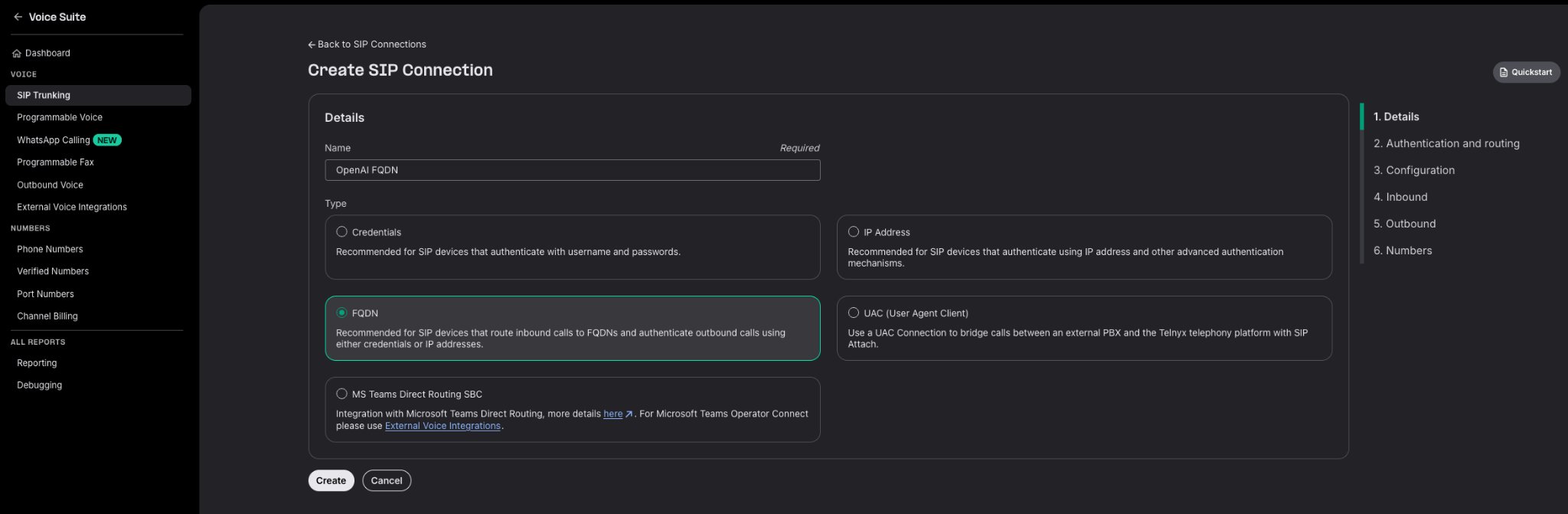
Create a SIP Connection with type FQDN.
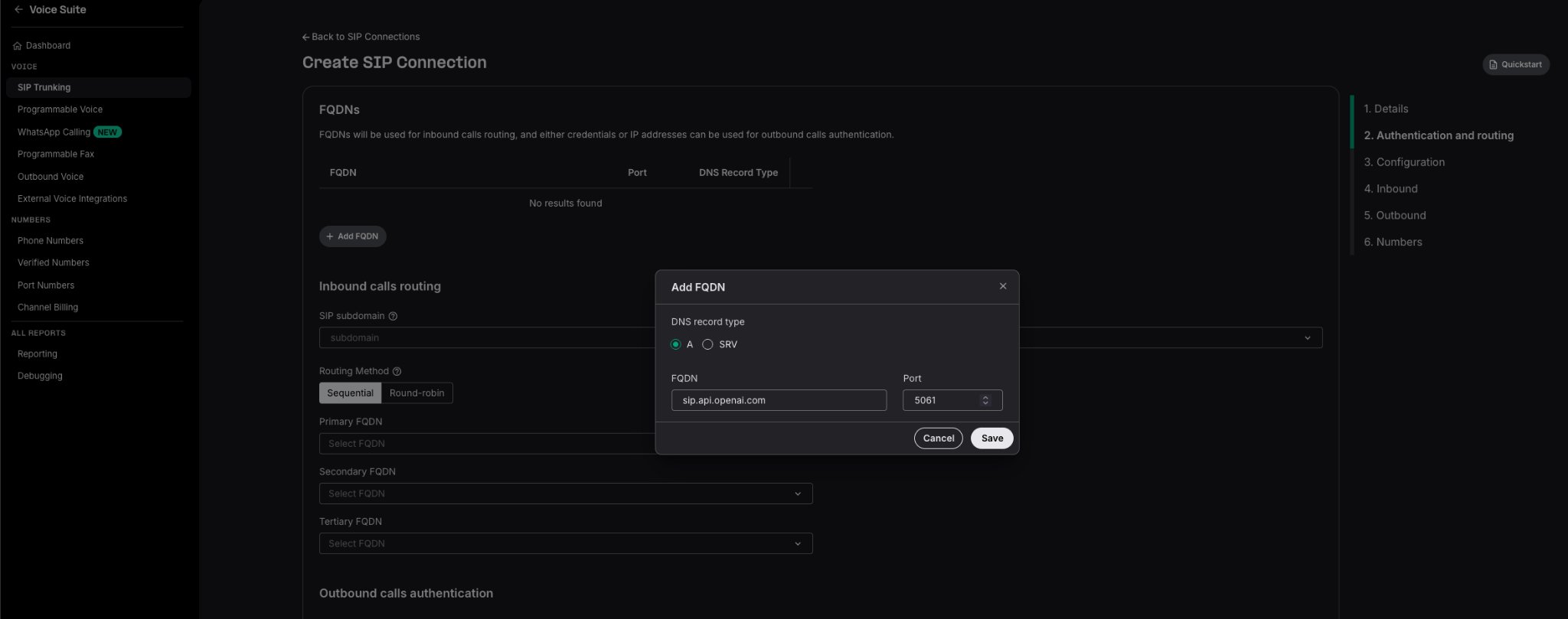
Add the OpenAI SIP hostname on port 5061.
Enable TLS and SRTP
Set Encrypted media to SRTP Mandatory in the connection configuration.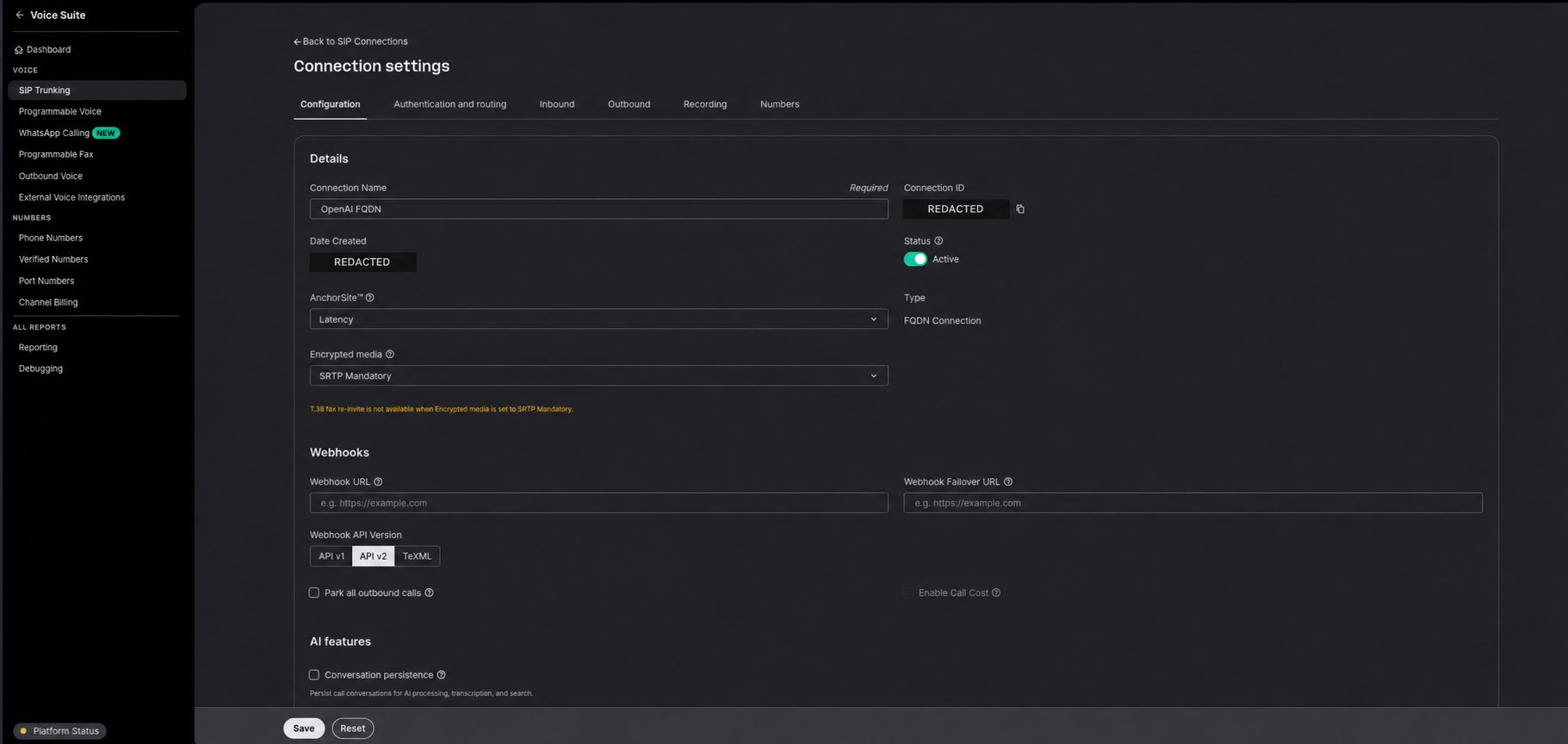
Require encrypted call media.
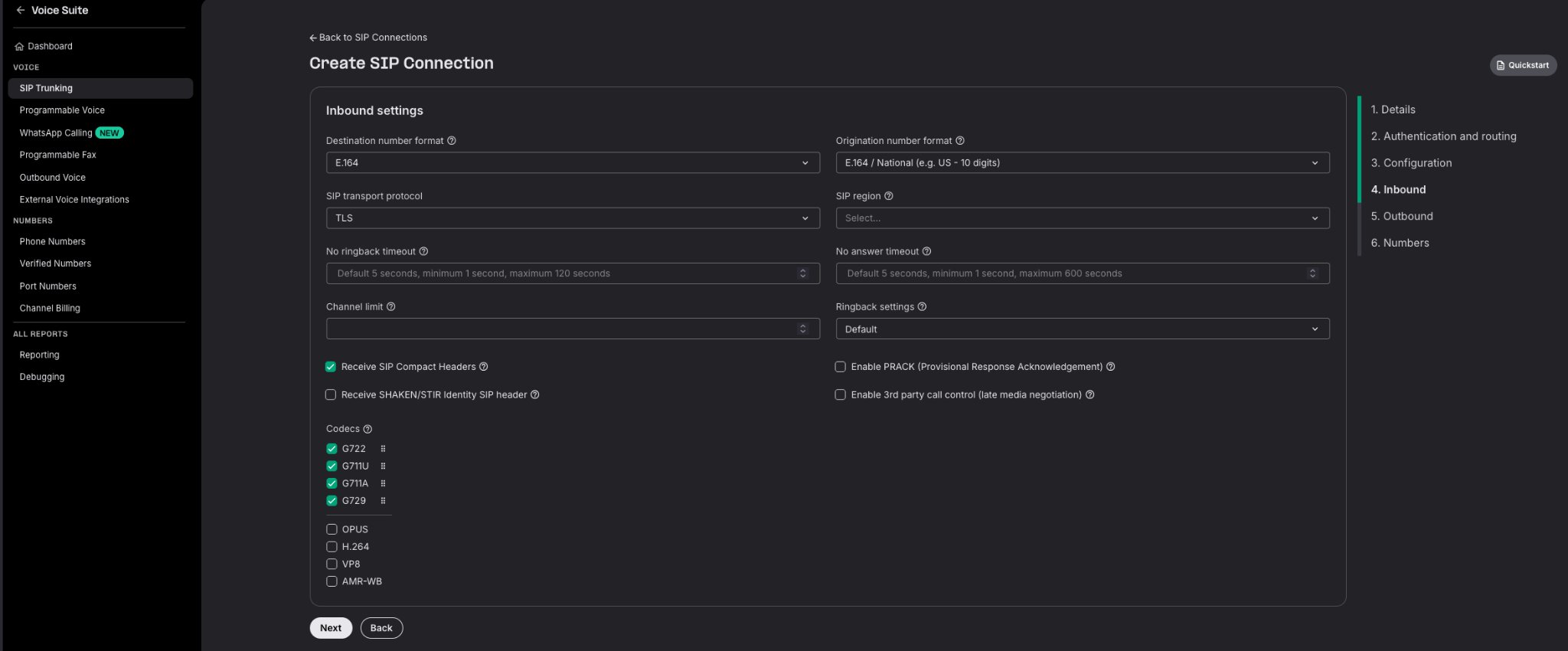
Use TLS for SIP signaling.
Configure codecs
Enable at least one codec supported by both sides. SIP offer and answer select the codec used on the OpenAI-facing leg. Confirm the negotiated codec in Telnyx SIP diagnostics; the screenshot illustrates the TLS setting, not a required codec selection.- Opus supports wideband audio.
- PCMU and PCMA provide narrowband compatibility when the complete route cannot negotiate Opus.
Do not configure Media Streaming linear16 here. Direct SIP carries media using the codec negotiated in SDP, and your sideband application does not convert or relay the audio.
Assign your Telnyx number
In Mission Control Portal:- Go to Numbers → My Numbers.
- Select the number callers will use.
- Assign the OpenAI GPT-Live SIP Connection.
- In the number’s Voice settings, set Translated Number to the OpenAI project ID, including
proj_. - Save the number configuration.

Assign the phone number to the OpenAI FQDN connection.
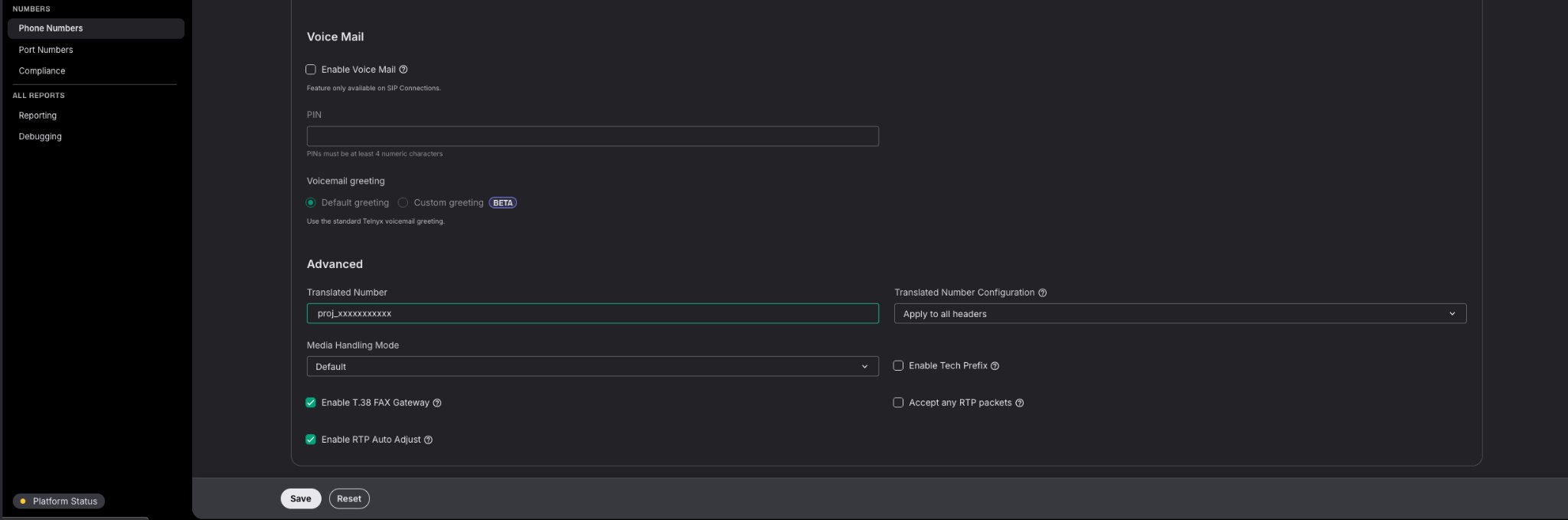
Route the number to the correct OpenAI project.
live.transport.incoming webhook subscription.
Calls to this number will now be routed to the OpenAI SIP destination. OpenAI sends the incoming-call webhook before the GPT-Live session is accepted.
Run the sideband application
Download the complete Python sample:telnyx_gpt_live_sip_server.py.
The bundled FastAPI application receives webhooks at /webhooks/openai and uses Responses delegation for order lookup and transfer. Set the webhook URL to this exact route; / will not reach the handler. The client-delegation payload below is a separate minimal contract example for applications that supply their own backend.
The application:
- Verifies the OpenAI webhook signature.
- Applies a caller admission check.
- Accepts or rejects the GPT-Live session.
- Attaches to the session over the sideband WebSocket.
- Handles delegated order lookups.
- Transfers callers only to an application-controlled destination.
- Attempts a safe transfer or hangup if sideband control fails.
Install dependencies
Configure environment variables
Inject credentials from a secret manager, or create a local.env excluded from version control with owner-only access. The bundled application loads these settings:
Start the server
Verify the local server
https://YOUR_TUNNEL/webhooks/openai in OpenAI. The health endpoint confirms the process is running; it does not validate credentials or SIP routing.
Accept the GPT-Live session
After verifying the webhook, accept the call using:Authorization: Bearer OPENAI_API_KEY and Content-Type: application/json from the application. For the tested configuration in this guide, also send OpenAI-Alpha: quicksilver=v3.
A minimal client-delegation configuration is:
audio.format: SDP negotiates the media format.
The downloadable application instead uses this Responses-delegation configuration:
Attach the sideband connection
After accepting the call, connect your server to:session.start on an attached session.
The sideband connection carries session events and application commands. SIP remains the primary call audio path. Attach promptly and install the event reader before sending commands because events emitted before attachment may not be replayed.
Handle tools with Responses delegation
GPT-Live supports Client and Responses delegation:- Client delegation: Your application performs the delegated work and provides context for GPT-Live to speak.
- Responses delegation: GPT-Live delegates to a configured Responses backend. OpenAI runs supported hosted tools, while your application executes client-actionable functions.
lookup_order and transfer_to_human. Tool definitions belong under session.delegation.responses.
Responses events arrive inside a response.event envelope. Read the nested event.type, collect completed function calls from nested response.output_item.done events and preserve the outer delegation_id for correlation.
For each client-actionable function call:
- Validate the tool name and arguments.
- Authenticate and authorize the requested action.
- Execute the operation with a timeout and idempotency protection.
- Submit a
response.item.createevent with the matchingcall_id. - After every function result for that delegation has been submitted, send a single
response.createto continue delegated work.
response.completed event before deciding that every call has been seen. The sample tracks outstanding calls per delegation_id and continues only once.
delegation_id arrives on the inbound response.event envelope and is how you group nested events by delegation. Do not echo it back on response.item.create or response.create — neither command takes that field. A tool result is matched by item.call_id, and the optional event_id you set on a command comes back as client_event_id on the corresponding server event. The one client command that does take delegation_id is session.commentary.append, which requires it and accepts only null under Responses delegation.Submitting a function result does not automatically continue the response.
Greet the caller
After attaching the sideband receiver, the sample appends a spoken greeting:Transfer or end a call
Thetransfer_to_human tool uses the destination stored in TRANSFER_TARGET_URI. The model does not supply the destination.
Transfer an active call using:
Test the complete transfer outcome. A successful API response confirms that the request was accepted, not that the destination answered or that two-way audio was established.
session.closed before releasing resources.
Reject a pending call
ALLOWED_CALLER_PREFIXES.
Test the integration
Call the assigned Telnyx number and verify:
Use Telnyx SIP call diagnostics and packet captures to inspect the Request-URI, SIP responses, SDP offer and answer, selected codec, SRTP negotiation, packet loss and jitter. Redact credentials and SDP inline SRTP key material before sharing traces.
Test another voice
SetOPENAI_VOICE=cedar, restart the application and place a new call. Use only voices supported by the selected model and project. Voice selection happens at acceptance; a source or environment change does not alter an active call. If acceptance fails, inspect the error and restore a known-supported voice.
Test webhook security
- Send a request with an invalid signature and expect
401from the bundled application. - Send a correctly signed non-SIP event and expect a harmless
200. - Send a correctly signed SIP event without
data.session_idand expect400. - Deliver the same correctly signed webhook twice, including concurrently, and verify one call decision.
Troubleshooting
session_id_not_found
Confirm the API key, webhook and SIP destination use the same OpenAI project. Preserve data.session_id unchanged, including its prefix. Do not substitute the SIP Call-ID, a Telnyx call ID or a Realtime call_id. Use /v1/live/sessions/... for Live operations.
No webhook arrives
Confirm the public HTTPS URL is reachable, its route is/webhooks/openai for the bundled sample, and the tunnel forwards to port 8000. Verify the live.transport.incoming subscription, number assignment, FQDN and translated project ID.
The call is rejected or has no audio
Check TLS signaling, mandatory SRTP, the project ID in the SIP Request-URI, a compatible codec and a successful SDP offer/answer. Check signaling and negotiated media connectivity on the Telnyx-to-OpenAI path. The application’s HTTPS tunnel carries webhooks, not SIP audio.The call connects but there is no greeting
Confirm acceptance succeeded before opening the sideband. Check the exact session ID, project key and the configured header,OpenAI-Alpha: quicksilver=v3. Send session.commentary.append rather than session.start. Keep the application and background event handler running after returning the webhook response.
Transfer outcome is unknown
A timeout, transport error or 5xx response can occur after a transfer takes effect. The sample keeps a per-session transfer marker shared by tool calls and fallback. It reportstransfer_unknown or transfer_pending to the backend and neither repeats the transfer nor hangs up. An HTTP success confirms the request was accepted, not that the destination answered. Production deployments need durable state and provider-side reconciliation.
Normal hangup closes the sideband without a close frame
A caller hangup can look like a WebSocket failure. If fallback receives404 with session_id_not_found, the sample treats the call as already ended and does not issue another hangup. Other 404 errors are not assumed to mean the call ended.