

Core technologies
- Real-Time Media Streaming: Telnyx’s global private MPLS network combined with WebSocket technology streams raw audio instantly, ensuring high-quality, real-time voice conversations with minimal latency.
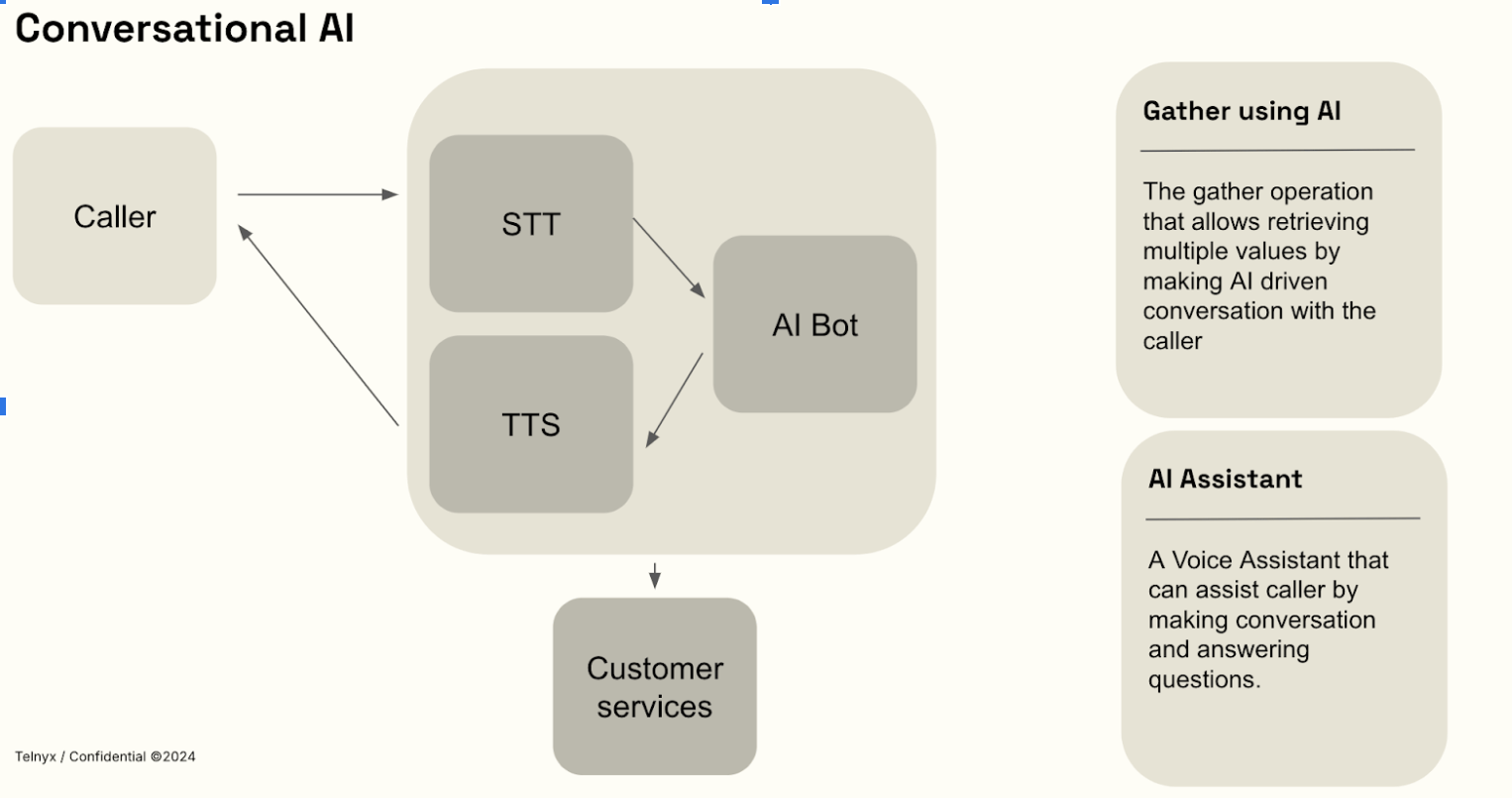
- Speech-to-Text (STT): Converts real-time live audio streams into text for immediate processing.
- Large Language Models (LLMs): Advanced AI models interpret language and generate accurate, context-sensitive responses. You can use pre-trained models or customize your own.
- Text-to-Speech (TTS): Transforms AI-generated text responses into realistic, human-like speech instantly streamed back to users.
How It Works
We control every aspect—from network infrastructure to GPU-accelerated AI processing—to provide unmatched reliability, speed, and security. Telnyx Conversational AI operates through a fully integrated, bi-directional real-time streaming process:- Capture voice input: User speech is instantly captured and transmitted securely to Telnyx servers using WebSocket.
- Speech-to-Text processing (speech recognition): Immediate transcription of audio into text happens directly on Telnyx’s edge-based GPUs.
- AI-Driven Response Generation: AI analyzes user intent and generates context-aware responses.
- Text-to-Speech output: The AI-generated responses are converted into natural speech and streamed back instantly to the user.
Get started with the API
For an inbound call that an AI assistant should handle from pickup, send the Call Controlanswer command with assistant.id. Telnyx attempts to warm up the assistant before answering, reducing the preparation left after pickup. Create an assistant through the Assistants API or the Telnyx Portal, then use its ID in the request:
ai_assistant_start. Track pickup with the call.answered webhook because the HTTP response can arrive first. Warm-up does not wait for greeting audio or guarantee zero silence after answer.
For a call that is already answered, use ai_assistant_start. See Attach an AI Assistant to a Call for both flows, per-call voice and transcription overrides, and guidance on measuring startup delay.
Prerequisites
- Create a Telnyx account and generate an API key.
- Set up a Call Control connection to receive inbound calls.
- Create an AI assistant in the Telnyx Portal or through the Assistants API.
- When the assistant should take an unanswered inbound call, send the combined
answerrequest above with the stored assistant ID and any per-call overrides.
Models & Supported Languages
Every voice AI conversation runs an LLM hosted on Telnyx GPU infrastructure (or a third-party model you supply). The model is set on the assistant, in the Agent tab in the Portal or through themodel field of the Assistants API.
Recommended and default model. New assistants and Portal templates use zai-org/GLM-5.3-Flash. The Assistants API applies this model when neither model nor external_llm is provided. Existing assistants keep their configured model.
Voice-verified models
Telnyx verifies a subset of models specifically for voice: they are deployed on the voice-serving endpoints, and endpointing, interruption handling, and latency are validated against live calls.Beyond the verified list above:
- Some models selectable for assistants are not verified for voice — they can be set on an assistant but have not been validated for live calls. Qwen models are not supported for Voice AI, including
Qwen/Qwen3-235B-A22B, which is selectable for assistants. zai-org/GLM-5.3-Flashis the recommended and default model for AI Assistants.- The chat-flagship models (
zai-org/GLM-5.3,moonshotai/Kimi-K3,MiniMaxAI/MiniMax-M3-MXFP8,Qwen/Qwen3.8-27B) are not available for AI Assistants — they are chat-only models (see Available Models).
Reasoning on voice calls
Reasoning (thinking) is always disabled on the voice path, even on models that are reasoning models in chat:- Reasoning adds latency between turns, which breaks the real-time flow of a phone conversation.
- The model responds only with the spoken answer; it never produces or speaks reasoning content.
- There is no setting to enable it: any reasoning-effort or thinking parameter on the request is overridden before the model is called.
reasoning_content response field on the chat path, see Inference getting started.
Languages and voices
TTS provider coverage is model-dependent. The available TTS voice catalog includes 3,800+ voices across 80+ language families and 200+ language or locale codes. Speech-to-text language coverage depends on the selected transcription model.Popular Use Cases
- AI-Powered Customer Support: Automate and enhance customer service interactions.
- Virtual Assistants & Intelligent IVR: Create intelligent virtual agents for natural, real-time user interactions.
- Real-Time Transcription & Insights: Instantly convert spoken conversations to text and gain actionable insights.
- Call Center Automation: Increase efficiency, reduce operational costs, and improve customer experiences through AI automation.