> ## Documentation Index
> Fetch the complete documentation index at: https://developers.telnyx.com/llms.txt
> Use this file to discover all available pages before exploring further.
# What is Conversational AI?
> Introduction to Telnyx Conversational AI — what it is, how STT, LLM, and TTS work together, and how to launch a voice agent that handles real phone calls.
Conversational AI enables machines to understand, interpret, and respond naturally to human language. At Telnyx, Conversational AI merges cutting-edge telecommunications infrastructure with advanced AI capabilities, delivering seamless, ultra-low-latency voice interactions.
## Core technologies
* **Real-Time Media Streaming**: Telnyx's global private MPLS network combined with WebSocket technology streams raw audio instantly, ensuring high-quality, real-time voice conversations with minimal latency.
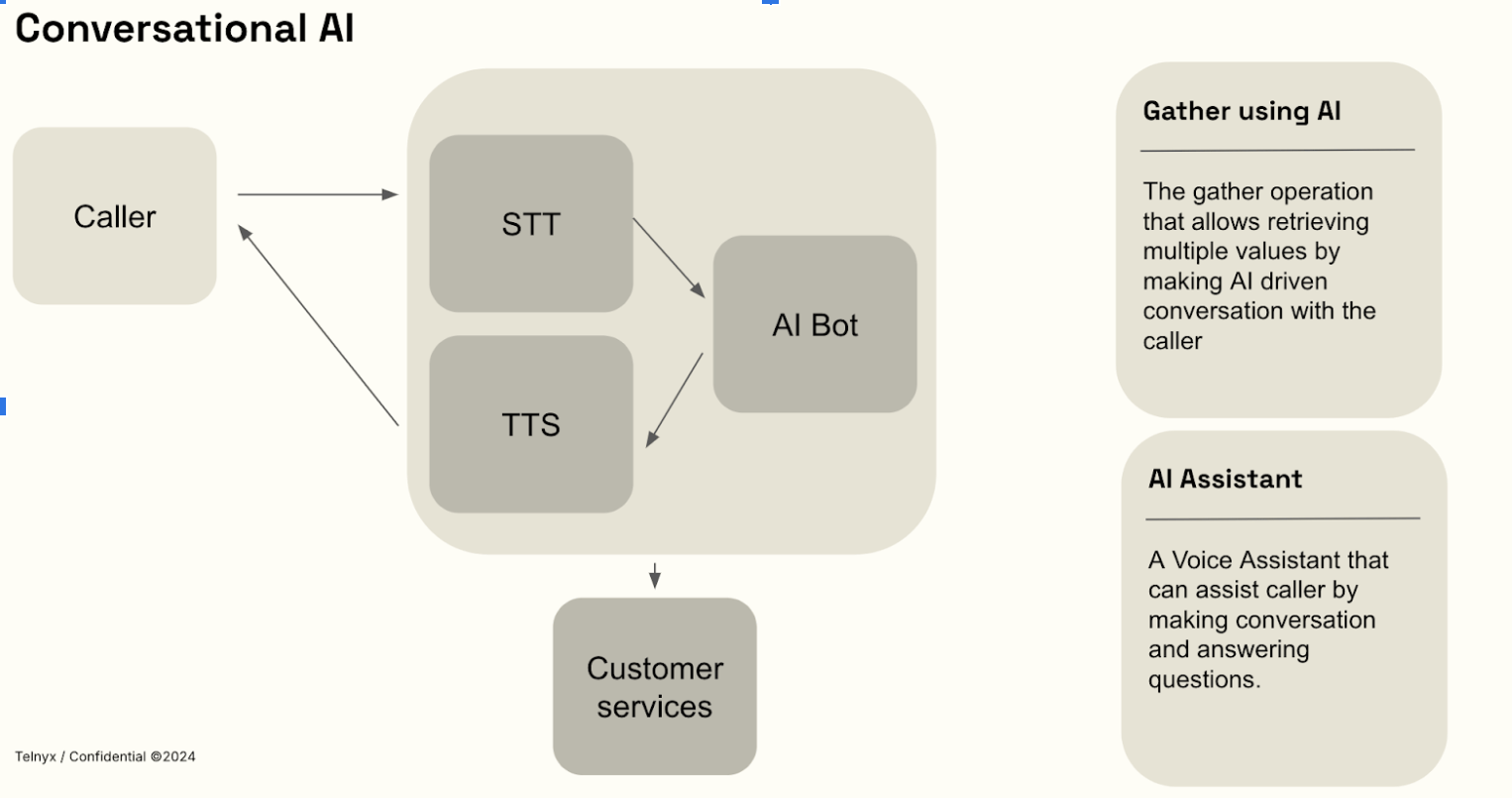
* **Speech-to-Text (STT)**: Converts real-time live audio streams into text for immediate processing.
* **Large Language Models (LLMs)**: Advanced AI models interpret language and generate accurate, context-sensitive responses. You can use pre-trained models or customize your own.
* **Text-to-Speech (TTS)**: Transforms AI-generated text responses into realistic, human-like speech instantly streamed back to users.
## How It Works
We control every aspect—from network infrastructure to GPU-accelerated AI processing—to provide unmatched reliability, speed, and security.
Telnyx Conversational AI operates through a fully integrated, bi-directional real-time streaming process:
1. **Capture voice input**: User speech is instantly captured and transmitted securely to Telnyx servers using WebSocket.
2. **Speech-to-Text processing (speech recognition)**: Immediate transcription of audio into text happens directly on Telnyx's edge-based GPUs.
3. **AI-Driven Response Generation**: AI analyzes user intent and generates context-aware responses.
4. **Text-to-Speech output**: The AI-generated responses are converted into natural speech and streamed back instantly to the user.
This integrated pipeline ensures smooth, natural conversational experiences with ultra-low latency.
 ## Get started with the API
To start an AI assistant on a live call, use the Call Control `ai_assistant_start` command. You need an AI assistant configured in the [Telnyx Portal](https://portal.telnyx.com) and an active call via Call Control.
```bash theme={null}
curl -X POST https://api.telnyx.com/v2/calls/{call_control_id}/actions/ai_assistant_start \
-H "Authorization: Bearer $TELNYX_API_KEY" \
-H "Content-Type: application/json" \
-d '{
"assistant": {
"id": "your-assistant-id",
"instructions": "You are a friendly customer support agent.",
"model": "gpt-4o"
},
"greeting": "Hello! How can I help you today?",
"transcription": {
"engine": "telnyx"
}
}'
```
### Prerequisites
1. [Create a Telnyx account](https://telnyx.com/sign-up) and generate an [API key](/docs/development/api-fundamentals/create-api-keys).
2. Set up a [Call Control connection](/docs/voice/programmable-voice/voice-api-fundamentals) to receive inbound calls.
3. Create an AI assistant in the [Telnyx Portal](https://portal.telnyx.com) or use the assistant configuration inline.
4. When a call arrives, answer it via Call Control and then start the AI assistant using the command above.
## Models & Supported Languages
Every voice AI conversation runs an LLM hosted on Telnyx GPU infrastructure (or a third-party model you supply). The model is set on the assistant, in the **Agent** tab in the [Portal](https://portal.telnyx.com/#/ai/assistants) or through the `model` field of the [Assistants API](/api-reference/assistants/create-an-assistant).
**Default model.** If no model is set, the assistant uses `moonshotai/Kimi-K2.6`.
### Voice-verified models
Telnyx verifies a subset of models specifically for voice: they are deployed on the voice-serving endpoints, and endpointing, interruption handling, and latency are validated against live calls.
| Model | Voice status | Notes |
| ---------------------- | ------------------ | ------------------------------ |
| `moonshotai/Kimi-K2.6` | Verified — default | Default model when none is set |
| `moonshotai/Kimi-K2.5` | Verified | Previous default |
| `zai-org/GLM-5.2` | Verified | |
Beyond the verified list above:
* Some models selectable for assistants are **not verified for voice** — they can be set on an assistant but have not been validated for live calls. Qwen models are **not supported** for Voice AI, including `Qwen/Qwen3-235B-A22B`, which is selectable for assistants.
* The chat-flagship models (`zai-org/GLM-5.3`, `zai-org/GLM-5.3-Flash`, `moonshotai/Kimi-K3`, `MiniMaxAI/MiniMax-M3-MXFP8`, `Qwen/Qwen3.8-27B`) are **not available for AI Assistants** — they are chat-only models (see [Available Models](/docs/inference/models)).
You can also use a hosted model from another provider (OpenAI, Anthropic, Google, or a custom LLM endpoint). These models carry no Telnyx voice verification — see [Custom LLMs for Assistants](/docs/inference/ai-assistants/custom-llm).
### Reasoning on voice calls
Reasoning (thinking) is always disabled on the voice path, even on models that are reasoning models in chat:
* Reasoning adds latency between turns, which breaks the real-time flow of a phone conversation.
* The model responds only with the spoken answer; it never produces or speaks reasoning content.
* There is no setting to enable it: any reasoning-effort or thinking parameter on the request is overridden before the model is called.
For reasoning models and the `reasoning_content` response field on the chat path, see [Inference getting started](/docs/inference/getting-started).
### Languages and voices
TTS provider coverage is model-dependent. The available TTS voice catalog includes 3,800+ voices across 80+ language families and 200+ language or locale codes. Speech-to-text language coverage depends on the selected transcription model.
## Popular Use Cases
* **AI-Powered Customer Support**: Automate and enhance customer service interactions.
* **Virtual Assistants & Intelligent IVR**: Create intelligent virtual agents for natural, real-time user interactions.
* **Real-Time Transcription & Insights**: Instantly convert spoken conversations to text and gain actionable insights.
* **Call Center Automation**: Increase efficiency, reduce operational costs, and improve customer experiences through AI automation.
## Get started with the API
To start an AI assistant on a live call, use the Call Control `ai_assistant_start` command. You need an AI assistant configured in the [Telnyx Portal](https://portal.telnyx.com) and an active call via Call Control.
```bash theme={null}
curl -X POST https://api.telnyx.com/v2/calls/{call_control_id}/actions/ai_assistant_start \
-H "Authorization: Bearer $TELNYX_API_KEY" \
-H "Content-Type: application/json" \
-d '{
"assistant": {
"id": "your-assistant-id",
"instructions": "You are a friendly customer support agent.",
"model": "gpt-4o"
},
"greeting": "Hello! How can I help you today?",
"transcription": {
"engine": "telnyx"
}
}'
```
### Prerequisites
1. [Create a Telnyx account](https://telnyx.com/sign-up) and generate an [API key](/docs/development/api-fundamentals/create-api-keys).
2. Set up a [Call Control connection](/docs/voice/programmable-voice/voice-api-fundamentals) to receive inbound calls.
3. Create an AI assistant in the [Telnyx Portal](https://portal.telnyx.com) or use the assistant configuration inline.
4. When a call arrives, answer it via Call Control and then start the AI assistant using the command above.
## Models & Supported Languages
Every voice AI conversation runs an LLM hosted on Telnyx GPU infrastructure (or a third-party model you supply). The model is set on the assistant, in the **Agent** tab in the [Portal](https://portal.telnyx.com/#/ai/assistants) or through the `model` field of the [Assistants API](/api-reference/assistants/create-an-assistant).
**Default model.** If no model is set, the assistant uses `moonshotai/Kimi-K2.6`.
### Voice-verified models
Telnyx verifies a subset of models specifically for voice: they are deployed on the voice-serving endpoints, and endpointing, interruption handling, and latency are validated against live calls.
| Model | Voice status | Notes |
| ---------------------- | ------------------ | ------------------------------ |
| `moonshotai/Kimi-K2.6` | Verified — default | Default model when none is set |
| `moonshotai/Kimi-K2.5` | Verified | Previous default |
| `zai-org/GLM-5.2` | Verified | |
Beyond the verified list above:
* Some models selectable for assistants are **not verified for voice** — they can be set on an assistant but have not been validated for live calls. Qwen models are **not supported** for Voice AI, including `Qwen/Qwen3-235B-A22B`, which is selectable for assistants.
* The chat-flagship models (`zai-org/GLM-5.3`, `zai-org/GLM-5.3-Flash`, `moonshotai/Kimi-K3`, `MiniMaxAI/MiniMax-M3-MXFP8`, `Qwen/Qwen3.8-27B`) are **not available for AI Assistants** — they are chat-only models (see [Available Models](/docs/inference/models)).
You can also use a hosted model from another provider (OpenAI, Anthropic, Google, or a custom LLM endpoint). These models carry no Telnyx voice verification — see [Custom LLMs for Assistants](/docs/inference/ai-assistants/custom-llm).
### Reasoning on voice calls
Reasoning (thinking) is always disabled on the voice path, even on models that are reasoning models in chat:
* Reasoning adds latency between turns, which breaks the real-time flow of a phone conversation.
* The model responds only with the spoken answer; it never produces or speaks reasoning content.
* There is no setting to enable it: any reasoning-effort or thinking parameter on the request is overridden before the model is called.
For reasoning models and the `reasoning_content` response field on the chat path, see [Inference getting started](/docs/inference/getting-started).
### Languages and voices
TTS provider coverage is model-dependent. The available TTS voice catalog includes 3,800+ voices across 80+ language families and 200+ language or locale codes. Speech-to-text language coverage depends on the selected transcription model.
## Popular Use Cases
* **AI-Powered Customer Support**: Automate and enhance customer service interactions.
* **Virtual Assistants & Intelligent IVR**: Create intelligent virtual agents for natural, real-time user interactions.
* **Real-Time Transcription & Insights**: Instantly convert spoken conversations to text and gain actionable insights.
* **Call Center Automation**: Increase efficiency, reduce operational costs, and improve customer experiences through AI automation.