> ## Documentation Index
> Fetch the complete documentation index at: https://developers.telnyx.com/llms.txt
> Use this file to discover all available pages before exploring further.
# Structured data insights
> Create AI Insights with defined JSON schemas for consistent, structured data extraction from conversations.
Structured insights extract data in a predefined JSON schema format, providing consistent, machine-readable results perfect for analytics, dashboards, and downstream processing.
## When to use structured insights
Choose structured insights when you need:
* **Quantitative Metrics** - Scores, ratings, counts, percentages.
* **Categorical Data** - Status values, types, priorities, classifications.
* **Boolean Flags** - Yes/no decisions, presence checks, compliance indicators.
* **Consistent Format** - Data that feeds into databases, dashboards, or analytics systems.
* **Multiple Related Fields** - Complex data with multiple attributes.
| Use Case | Unstructured | Structured |
| ----------------------- | ------------ | ---------- |
| Open-ended summaries | ✅ | ❌ |
| Sentiment scoring (1-5) | ❌ | ✅ |
| Issue categorization | ❌ | ✅ |
| Descriptive analysis | ✅ | ❌ |
| Compliance flags | ❌ | ✅ |
| Dashboard metrics | ❌ | ✅ |
## Creating a structured insight
### Step 1: Start creating an insight
1. Navigate to [AI Insights](https://portal.telnyx.com/#/ai/insights) in the Portal.
2. Click **Create Insight**.
3. Enter a name and basic instructions.
### Step 2: Enable structured data mode
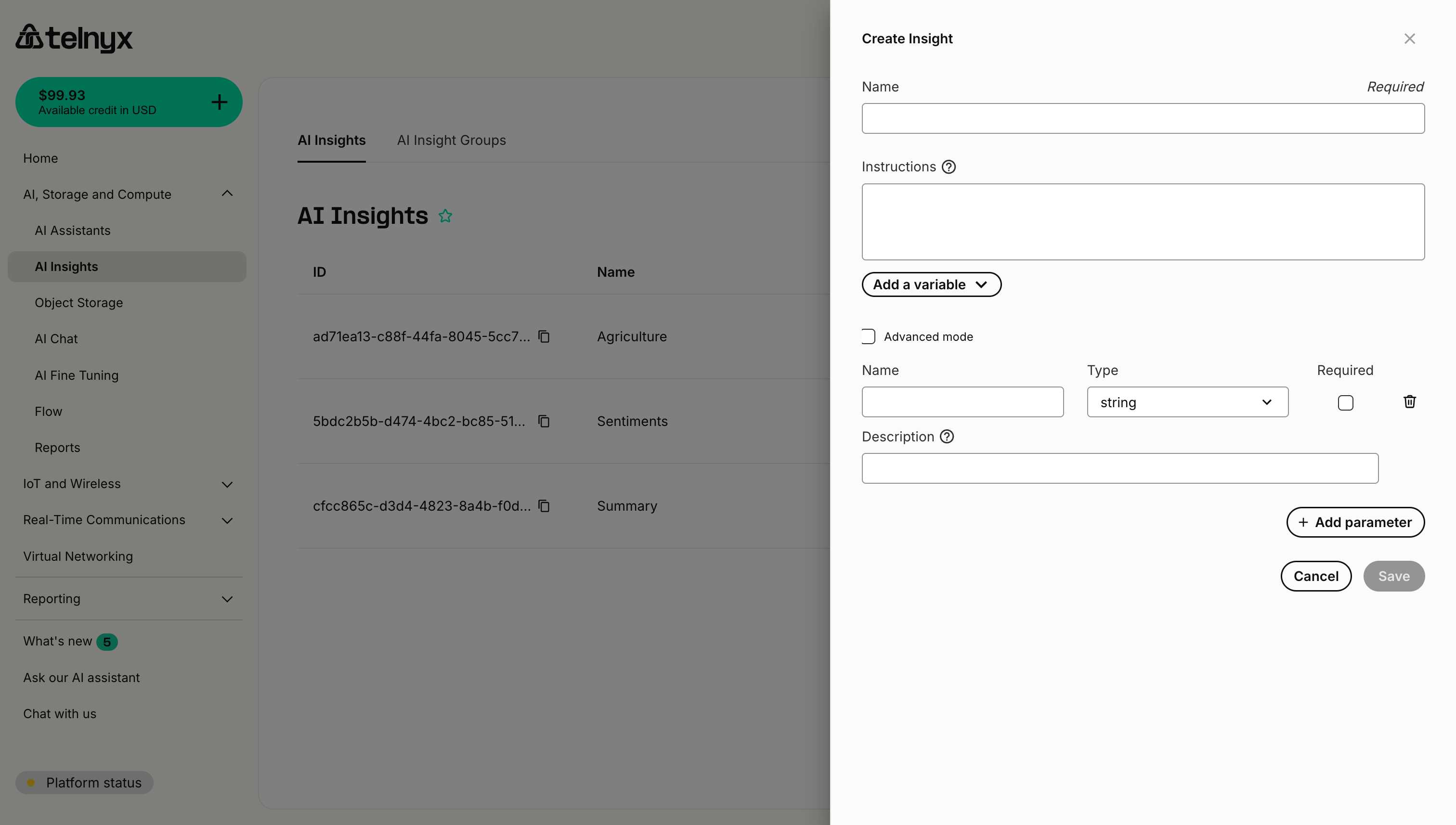
Click the **Collect as structured data** button to reveal the schema configuration interface.
 ### Step 3: Define parameters
For each piece of data you want to extract, add a parameter with:
1. **Name** - The field name in the JSON output (e.g., `sentiment_score`, `issue_type`).
2. **Type** - The data type (string, number, boolean, etc.).
3. **Required** - Whether this field must always be present.
4. **Description** - Instructions for extracting this specific field.
Click **Add parameter** to add additional fields to your schema.
## Parameter types
### String
Text values - use for categories, descriptions, identifiers.
**Example:**
```
Name: issue_category
Type: string
Description: The primary category of the customer's issue. Must be one of: "billing", "technical", "account", "general"
```
**Output:**
```json theme={null}
{
"issue_category": "technical"
}
```
### Enum
Predefined categories - use when you have a fixed set of possible values. The AI agent will select one value from your provided list.
**Example:**
```
Name: sentiment
Type: enum
Enum Values (comma separated): positive, negative, neutral, mixed
Description: Overall sentiment of the customer during the conversation
```
**Output:**
```json theme={null}
{
"sentiment": "positive"
}
```
Enums provide better accuracy than asking the AI agent to choose from options in a string description. They enforce strict value validation and make the AI agent's task clearer.
### Number
Numeric values - use for scores, ratings, counts, percentages.
**Example:**
```
Name: satisfaction_score
Type: number
Description: Customer satisfaction rating from 1-10 based on their tone and statements
```
**Output:**
```json theme={null}
{
"satisfaction_score": 8
}
```
### Integer
Whole number values - use when you need integers without decimals (counts, quantities, IDs).
**Example:**
```
Name: message_count
Type: integer
Description: Total number of messages sent by the customer in this conversation
```
**Output:**
```json theme={null}
{
"message_count": 5
}
```
Use `integer` instead of `number` when you specifically need whole numbers. This provides clearer intent and can help the AI agent avoid returning decimal values.
### Boolean
True/false values - use for flags, presence checks, yes/no decisions.
**Example:**
```
Name: escalation_needed
Type: boolean
Description: True if the conversation requires escalation to a supervisor or specialist
```
**Output:**
```json theme={null}
{
"escalation_needed": false
}
```
### Array
Lists of values - use for multiple items of the same type.
**Example:**
```
Name: products_mentioned
Type: array
Description: List of product names or SKUs mentioned during the conversation
```
**Output:**
```json theme={null}
{
"products_mentioned": ["Widget Pro", "Widget Basic", "Extended Warranty"]
}
```
### Array (string)
Lists of text values - use for multiple string items with enforced type safety.
**Example:**
```
Name: issue_keywords
Type: array (string)
Description: Key terms or phrases mentioned by the customer that describe their issue
```
**Output:**
```json theme={null}
{
"issue_keywords": ["billing", "refund", "overcharge"]
}
```
### Array (number)
Lists of numeric values - use for multiple numbers with enforced type safety.
**Example:**
```
Name: mentioned_prices
Type: array (number)
Description: All price points or dollar amounts mentioned during the conversation
```
**Output:**
```json theme={null}
{
"mentioned_prices": [29.99, 49.99, 99.99]
}
```
### Array (boolean)
Lists of true/false values - use for multiple boolean flags with enforced type safety.
**Example:**
```
Name: feature_preferences
Type: array (boolean)
Description: Customer preferences for features in order: email notifications, SMS alerts, push notifications
```
**Output:**
```json theme={null}
{
"feature_preferences": [true, false, true]
}
```
Typed arrays (string, number, boolean) provide better type safety than the generic `array` type. Use them when you know all elements will be of the same specific type.
### Object
Nested structures - use for complex related data.
**Example:**
```
Name: customer_info
Type: object
Description: Extracted customer information including name, account number, and contact preference
```
**Output:**
```json theme={null}
{
"customer_info": {
"name": "Jane Smith",
"account_number": "ACC-12345",
"preferred_contact": "email"
}
}
```
## Complete examples
### Example 1: Sentiment analysis
**Configuration:**
```
Name: Customer Sentiment Analysis
Instructions: Analyze the customer's emotional state throughout the conversation.
Parameters:
1. positivity_score
- Type: number
- Required: Yes
- Description: Rate positive sentiment from 1-5 (1=very negative, 5=very positive)
2. frustration_level
- Type: number
- Required: Yes
- Description: Rate customer frustration from 1-5 (1=not frustrated, 5=very frustrated)
3. overall_sentiment
- Type: string
- Required: Yes
- Description: Overall sentiment classification: "positive", "neutral", or "negative"
4. key_emotions
- Type: array
- Required: No
- Description: List of specific emotions detected (e.g., "happy", "confused", "angry", "satisfied")
```
**Sample Output:**
```json theme={null}
{
"positivity_score": 4,
"frustration_level": 2,
"overall_sentiment": "positive",
"key_emotions": ["satisfied", "relieved", "appreciative"]
}
```
### Example 2: Sales qualification
**Configuration:**
```
Name: Lead Qualification
Instructions: Assess the sales opportunity from this conversation.
Parameters:
1. budget_mentioned
- Type: boolean
- Required: Yes
- Description: Did the prospect mention or discuss budget?
2. budget_range
- Type: string
- Required: No
- Description: If mentioned, what budget range? (e.g., "under $1000", "$1000-$5000", "over $5000")
3. decision_timeframe
- Type: string
- Required: Yes
- Description: When do they need to make a decision? ("immediate", "this_month", "this_quarter", "exploring", "unknown")
4. pain_points
- Type: array
- Required: Yes
- Description: List of specific problems or needs mentioned
5. competitor_mentions
- Type: array
- Required: No
- Description: Names of competing solutions mentioned
6. lead_score
- Type: number
- Required: Yes
- Description: Qualification score from 1-10 based on buying signals
```
**Sample Output:**
```json theme={null}
{
"budget_mentioned": true,
"budget_range": "$1000-$5000",
"decision_timeframe": "this_month",
"pain_points": [
"Manual data entry taking too long",
"Errors in current system",
"No mobile access"
],
"competitor_mentions": ["CompetitorX", "LegacyTool"],
"lead_score": 8
}
```
### Example 3: Support ticket categorization
**Configuration:**
```
Name: Support Ticket Classification
Instructions: Categorize and triage the support request.
Parameters:
1. issue_type
- Type: string
- Required: Yes
- Description: Primary issue type: "technical", "billing", "account", "feature_request", "bug_report"
2. priority
- Type: string
- Required: Yes
- Description: Urgency level: "critical", "high", "medium", "low"
3. affected_service
- Type: string
- Required: No
- Description: Which product/service is affected?
4. resolved
- Type: boolean
- Required: Yes
- Description: Was the issue resolved during this conversation?
5. resolution_time_minutes
- Type: number
- Required: No
- Description: If resolved, how many minutes did it take?
6. follow_up_needed
- Type: boolean
- Required: Yes
- Description: Does this require follow-up action?
7. tags
- Type: array
- Required: No
- Description: Relevant tags for categorization (e.g., "password_reset", "billing_dispute", "api_error")
```
**Sample Output:**
```json theme={null}
{
"issue_type": "technical",
"priority": "high",
"affected_service": "API Integration",
"resolved": true,
"resolution_time_minutes": 12,
"follow_up_needed": false,
"tags": ["api_error", "authentication", "resolved"]
}
```
## Advanced mode
Enable **Advanced mode** (checkbox at the top of the structured data section) to access additional schema configuration options:
* Custom validation rules.
* Enum constraints for string values.
* Min/max constraints for numbers.
* Pattern matching for strings.
* Nested object definitions.
## Best practices
### 1. Keep schemas focused
Don't try to extract everything in one insight. Create multiple focused insights instead:
* ✅ Separate insights for "Sentiment" and "Issue Classification"
* ❌ One massive insight trying to capture sentiment, classification, entities, summary, etc.
### 2. Make instructions clear
Each parameter's description should be crystal clear:
```
❌ Bad: "sentiment score"
✅ Good: "Rate overall sentiment from 1-10, where 1 is very negative, 5 is neutral, and 10 is very positive"
```
### 3. Use enums for categories
When you have a fixed set of categories, use the **enum** type instead of listing values in a string description:
**❌ Less effective (using string with description):**
```
Type: string
Description: Classification must be one of: "billing_question", "technical_support", "feature_request", "complaint", "general_inquiry"
```
**✅ Better (using enum type):**
```
Type: enum
Enum Values (comma separated): billing_question, technical_support, feature_request, complaint, general_inquiry
Description: The primary classification of the customer inquiry
```
Using the enum type provides better accuracy and enforces strict value validation. See the [Enum parameter type](#enum) section for more details.
### 4. Mark optional appropriately
Only mark fields as required if they should always be extractable:
* **Required**: `overall_sentiment` - should always be detectable
* **Optional**: `competitor_mentioned` - may not come up in every conversation
### 5. Provide value ranges
For numeric fields, specify the range:
```
Description: Urgency score from 1-5, where 1 is low priority and 5 is critical/urgent
```
### 6. Test with edge cases
Test your structured insights with:
* Very short conversations.
* Conversations where some information is missing.
* Ambiguous or unclear discussions.
* Multiple topics in one conversation.
## Next steps
* **[Create Insight Groups](https://developers.telnyx.com/docs/inference/ai-insights/insight-groups)** - Organize your structured insights.
* **[Explore Use Cases](https://developers.telnyx.com/docs/inference/ai-insights/use-cases)** - Industry-specific structured insight examples.
## Related resources
* [Creating Insights](https://developers.telnyx.com/docs/inference/ai-insights/creating-insights) - Basic insight creation.
* [Insight Groups](https://developers.telnyx.com/docs/inference/ai-insights/insight-groups) - Organizing insights.
* [API Reference](/api-reference/assistants/list-assistants) - Programmatic access to insights.
### Step 3: Define parameters
For each piece of data you want to extract, add a parameter with:
1. **Name** - The field name in the JSON output (e.g., `sentiment_score`, `issue_type`).
2. **Type** - The data type (string, number, boolean, etc.).
3. **Required** - Whether this field must always be present.
4. **Description** - Instructions for extracting this specific field.
Click **Add parameter** to add additional fields to your schema.
## Parameter types
### String
Text values - use for categories, descriptions, identifiers.
**Example:**
```
Name: issue_category
Type: string
Description: The primary category of the customer's issue. Must be one of: "billing", "technical", "account", "general"
```
**Output:**
```json theme={null}
{
"issue_category": "technical"
}
```
### Enum
Predefined categories - use when you have a fixed set of possible values. The AI agent will select one value from your provided list.
**Example:**
```
Name: sentiment
Type: enum
Enum Values (comma separated): positive, negative, neutral, mixed
Description: Overall sentiment of the customer during the conversation
```
**Output:**
```json theme={null}
{
"sentiment": "positive"
}
```
Enums provide better accuracy than asking the AI agent to choose from options in a string description. They enforce strict value validation and make the AI agent's task clearer.
### Number
Numeric values - use for scores, ratings, counts, percentages.
**Example:**
```
Name: satisfaction_score
Type: number
Description: Customer satisfaction rating from 1-10 based on their tone and statements
```
**Output:**
```json theme={null}
{
"satisfaction_score": 8
}
```
### Integer
Whole number values - use when you need integers without decimals (counts, quantities, IDs).
**Example:**
```
Name: message_count
Type: integer
Description: Total number of messages sent by the customer in this conversation
```
**Output:**
```json theme={null}
{
"message_count": 5
}
```
Use `integer` instead of `number` when you specifically need whole numbers. This provides clearer intent and can help the AI agent avoid returning decimal values.
### Boolean
True/false values - use for flags, presence checks, yes/no decisions.
**Example:**
```
Name: escalation_needed
Type: boolean
Description: True if the conversation requires escalation to a supervisor or specialist
```
**Output:**
```json theme={null}
{
"escalation_needed": false
}
```
### Array
Lists of values - use for multiple items of the same type.
**Example:**
```
Name: products_mentioned
Type: array
Description: List of product names or SKUs mentioned during the conversation
```
**Output:**
```json theme={null}
{
"products_mentioned": ["Widget Pro", "Widget Basic", "Extended Warranty"]
}
```
### Array (string)
Lists of text values - use for multiple string items with enforced type safety.
**Example:**
```
Name: issue_keywords
Type: array (string)
Description: Key terms or phrases mentioned by the customer that describe their issue
```
**Output:**
```json theme={null}
{
"issue_keywords": ["billing", "refund", "overcharge"]
}
```
### Array (number)
Lists of numeric values - use for multiple numbers with enforced type safety.
**Example:**
```
Name: mentioned_prices
Type: array (number)
Description: All price points or dollar amounts mentioned during the conversation
```
**Output:**
```json theme={null}
{
"mentioned_prices": [29.99, 49.99, 99.99]
}
```
### Array (boolean)
Lists of true/false values - use for multiple boolean flags with enforced type safety.
**Example:**
```
Name: feature_preferences
Type: array (boolean)
Description: Customer preferences for features in order: email notifications, SMS alerts, push notifications
```
**Output:**
```json theme={null}
{
"feature_preferences": [true, false, true]
}
```
Typed arrays (string, number, boolean) provide better type safety than the generic `array` type. Use them when you know all elements will be of the same specific type.
### Object
Nested structures - use for complex related data.
**Example:**
```
Name: customer_info
Type: object
Description: Extracted customer information including name, account number, and contact preference
```
**Output:**
```json theme={null}
{
"customer_info": {
"name": "Jane Smith",
"account_number": "ACC-12345",
"preferred_contact": "email"
}
}
```
## Complete examples
### Example 1: Sentiment analysis
**Configuration:**
```
Name: Customer Sentiment Analysis
Instructions: Analyze the customer's emotional state throughout the conversation.
Parameters:
1. positivity_score
- Type: number
- Required: Yes
- Description: Rate positive sentiment from 1-5 (1=very negative, 5=very positive)
2. frustration_level
- Type: number
- Required: Yes
- Description: Rate customer frustration from 1-5 (1=not frustrated, 5=very frustrated)
3. overall_sentiment
- Type: string
- Required: Yes
- Description: Overall sentiment classification: "positive", "neutral", or "negative"
4. key_emotions
- Type: array
- Required: No
- Description: List of specific emotions detected (e.g., "happy", "confused", "angry", "satisfied")
```
**Sample Output:**
```json theme={null}
{
"positivity_score": 4,
"frustration_level": 2,
"overall_sentiment": "positive",
"key_emotions": ["satisfied", "relieved", "appreciative"]
}
```
### Example 2: Sales qualification
**Configuration:**
```
Name: Lead Qualification
Instructions: Assess the sales opportunity from this conversation.
Parameters:
1. budget_mentioned
- Type: boolean
- Required: Yes
- Description: Did the prospect mention or discuss budget?
2. budget_range
- Type: string
- Required: No
- Description: If mentioned, what budget range? (e.g., "under $1000", "$1000-$5000", "over $5000")
3. decision_timeframe
- Type: string
- Required: Yes
- Description: When do they need to make a decision? ("immediate", "this_month", "this_quarter", "exploring", "unknown")
4. pain_points
- Type: array
- Required: Yes
- Description: List of specific problems or needs mentioned
5. competitor_mentions
- Type: array
- Required: No
- Description: Names of competing solutions mentioned
6. lead_score
- Type: number
- Required: Yes
- Description: Qualification score from 1-10 based on buying signals
```
**Sample Output:**
```json theme={null}
{
"budget_mentioned": true,
"budget_range": "$1000-$5000",
"decision_timeframe": "this_month",
"pain_points": [
"Manual data entry taking too long",
"Errors in current system",
"No mobile access"
],
"competitor_mentions": ["CompetitorX", "LegacyTool"],
"lead_score": 8
}
```
### Example 3: Support ticket categorization
**Configuration:**
```
Name: Support Ticket Classification
Instructions: Categorize and triage the support request.
Parameters:
1. issue_type
- Type: string
- Required: Yes
- Description: Primary issue type: "technical", "billing", "account", "feature_request", "bug_report"
2. priority
- Type: string
- Required: Yes
- Description: Urgency level: "critical", "high", "medium", "low"
3. affected_service
- Type: string
- Required: No
- Description: Which product/service is affected?
4. resolved
- Type: boolean
- Required: Yes
- Description: Was the issue resolved during this conversation?
5. resolution_time_minutes
- Type: number
- Required: No
- Description: If resolved, how many minutes did it take?
6. follow_up_needed
- Type: boolean
- Required: Yes
- Description: Does this require follow-up action?
7. tags
- Type: array
- Required: No
- Description: Relevant tags for categorization (e.g., "password_reset", "billing_dispute", "api_error")
```
**Sample Output:**
```json theme={null}
{
"issue_type": "technical",
"priority": "high",
"affected_service": "API Integration",
"resolved": true,
"resolution_time_minutes": 12,
"follow_up_needed": false,
"tags": ["api_error", "authentication", "resolved"]
}
```
## Advanced mode
Enable **Advanced mode** (checkbox at the top of the structured data section) to access additional schema configuration options:
* Custom validation rules.
* Enum constraints for string values.
* Min/max constraints for numbers.
* Pattern matching for strings.
* Nested object definitions.
## Best practices
### 1. Keep schemas focused
Don't try to extract everything in one insight. Create multiple focused insights instead:
* ✅ Separate insights for "Sentiment" and "Issue Classification"
* ❌ One massive insight trying to capture sentiment, classification, entities, summary, etc.
### 2. Make instructions clear
Each parameter's description should be crystal clear:
```
❌ Bad: "sentiment score"
✅ Good: "Rate overall sentiment from 1-10, where 1 is very negative, 5 is neutral, and 10 is very positive"
```
### 3. Use enums for categories
When you have a fixed set of categories, use the **enum** type instead of listing values in a string description:
**❌ Less effective (using string with description):**
```
Type: string
Description: Classification must be one of: "billing_question", "technical_support", "feature_request", "complaint", "general_inquiry"
```
**✅ Better (using enum type):**
```
Type: enum
Enum Values (comma separated): billing_question, technical_support, feature_request, complaint, general_inquiry
Description: The primary classification of the customer inquiry
```
Using the enum type provides better accuracy and enforces strict value validation. See the [Enum parameter type](#enum) section for more details.
### 4. Mark optional appropriately
Only mark fields as required if they should always be extractable:
* **Required**: `overall_sentiment` - should always be detectable
* **Optional**: `competitor_mentioned` - may not come up in every conversation
### 5. Provide value ranges
For numeric fields, specify the range:
```
Description: Urgency score from 1-5, where 1 is low priority and 5 is critical/urgent
```
### 6. Test with edge cases
Test your structured insights with:
* Very short conversations.
* Conversations where some information is missing.
* Ambiguous or unclear discussions.
* Multiple topics in one conversation.
## Next steps
* **[Create Insight Groups](https://developers.telnyx.com/docs/inference/ai-insights/insight-groups)** - Organize your structured insights.
* **[Explore Use Cases](https://developers.telnyx.com/docs/inference/ai-insights/use-cases)** - Industry-specific structured insight examples.
## Related resources
* [Creating Insights](https://developers.telnyx.com/docs/inference/ai-insights/creating-insights) - Basic insight creation.
* [Insight Groups](https://developers.telnyx.com/docs/inference/ai-insights/insight-groups) - Organizing insights.
* [API Reference](/api-reference/assistants/list-assistants) - Programmatic access to insights.