> ## Documentation Index
> Fetch the complete documentation index at: https://developers.telnyx.com/llms.txt
> Use this file to discover all available pages before exploring further.
# Tools Library
> Create tools once and share them across all your AI assistants. Migrate legacy tools at your own pace.
The Tools Library lets you create tools in a shared library and assign them to any assistant. Previously, tools were tied to individual assistants — if multiple assistants needed the same tool, you had to recreate it each time.
***
## Overview
With the Tools Library, you define a tool once and reuse it across all your assistants. Updating a shared tool keeps behavior consistent across every assistant that uses it.
***
## Capabilities
* **Shared tools** — Create tools in a central library and assign them to any assistant.
* **Reduced duplication** — Eliminates recreating identical tools across assistants with similar workflows.
* **Centralized configuration** — Update a tool in one place and maintain consistency across assistants.
* **Faster deployment** — Speed up assistant creation using prebuilt tools from the library.
***
## Getting started
1. Log in to the [Mission Control Portal](https://portal.telnyx.com).
2. Navigate to **AI, Storage and Compute** > **[AI Tools](https://portal.telnyx.com/#/ai/tools)**.
3. Click **Create New Tool** to add a new tool to the library.
4. When building or editing an assistant, assign tools from the library instead of creating them inline.
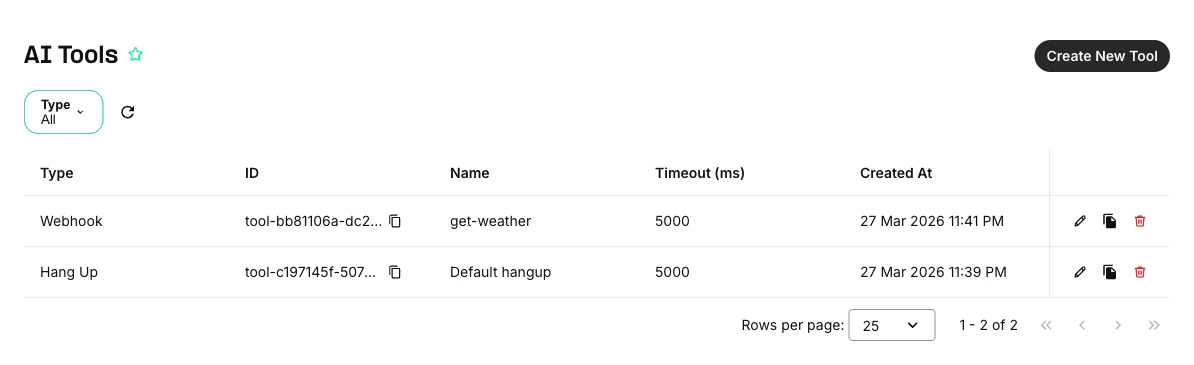 You can also assign library tools directly from the assistant builder.
***
## Migrating existing tools
Existing assistants with legacy (inline) tools continue to work. You can migrate legacy tools to the library at your own pace.
Migration is optional. Legacy tools remain functional. You can migrate tools one at a time as needed.
You can also assign library tools directly from the assistant builder.
***
## Migrating existing tools
Existing assistants with legacy (inline) tools continue to work. You can migrate legacy tools to the library at your own pace.
Migration is optional. Legacy tools remain functional. You can migrate tools one at a time as needed.