> ## Documentation Index
> Fetch the complete documentation index at: https://developers.telnyx.com/llms.txt
> Use this file to discover all available pages before exploring further.
# Agent Handoff
> Enable seamless AI-to-AI handoffs with specialized assistants working together in a single conversation, providing expert-level support across multiple domains.
Agent handoff enables your AI assistant to seamlessly transfer conversations to other specialized AI assistants while preserving full context. This allows you to build a team of expert agents, each focused on specific domains or tasks, working together to provide comprehensive support in a single conversation.
In this guide, you will learn how to:
* Configure agent handoff for your AI assistants.
* Choose between Unified and Distinct handoff modes.
* Design effective multi-agent architectures.
* Implement agent handoff via API and Portal.
***
## Overview
Agent handoff represents a powerful approach to building sophisticated AI systems. Instead of creating one complex agent that handles everything, you can build a team of specialized agents that collaborate seamlessly, each bringing domain expertise to the conversation.
Agent handoff is model-agnostic and works with any AI model supported by Telnyx, including OpenAI GPT models, Meta Llama models, Anthropic Claude, Qwen, and others. Each agent in the handoff chain can use a different model based on its specialized needs.
### How agent handoff works
The agent handoff lifecycle follows these steps:
1. **Detection**: The current agent identifies that another agent would be better suited to handle the user's request based on intent, domain, or task requirements.
2. **Agent selection**: The system determines which specialist agent should receive the handoff.
3. **Context transfer**: Full conversation history, user data, and relevant context is transferred to the target agent.
4. **Transition**: The handoff occurs, either seamlessly (Unified mode) or explicitly (Distinct mode).
5. **Continuation**: The target agent continues the conversation with full context awareness.
### Unified vs Distinct modes
Agent handoff supports two modes that determine how the transition appears to the user:
**Unified Mode (Default)**
In Unified mode, assistants share the same context and voice, creating a seamless experience where specialists work behind the scenes. The user experiences one consistent agent, even though multiple specialized assistants are handling different parts of the conversation.
* **Same voice**: All agents use the same voice configuration.
* **Transparent transition**: User doesn't notice the handoff.
* **Shared context**: Full conversation history available to all agents.
* **Use case**: When you want a unified brand experience.
**Distinct Mode**
In Distinct mode, each assistant retains its voice configuration, creating a conference call experience with multiple distinct voices. The user hears different voices as they're transferred between specialists.
* **Individual voices**: Each agent uses its own voice configuration.
* **Explicit transition**: User hears "I'm transferring you to \[specialist name]".
* **Shared context**: Full conversation history available to all agents.
* **Use case**: When you want to highlight specialist expertise.
### Key benefits
* **Specialist routing**: Direct queries to domain experts who provide accurate, focused responses.
* **Context preservation**: Full conversation history travels with the handoff, eliminating repetition.
* **Reduced complexity**: Build focused agents instead of one mega-agent trying to do everything.
* **Better user experience**: Users get the right expert for their specific needs.
* **Easier maintenance**: Update individual specialist agents without affecting the entire system.
* **Scalable architecture**: Add new specialists as your product or service expands.
### Common use cases
* **Multi-domain support**: Transfer between technical support, billing, and sales departments with full context.
* **Workflow automation**: Information gathering agent → processing agent → confirmation agent.
* **Triage and routing**: Assessment agent evaluates needs, then routes to appropriate specialist.
* **Language switching**: Detection agent identifies language, hands off to language-specific agent.
* **Escalation tiers**: Level 1 support → Level 2 support → Level 3 specialist.
* **Task segmentation**: Browse/Research agent → Purchase agent → Post-sale support agent.
***
## Best practices
Following these best practices will help you design effective multi-agent systems and maximize the value of agent handoff.
### Agent architecture design
**When to split agents vs one agent**
Split into multiple agents when:
* Domains require significantly different knowledge bases.
* Agents need different tools or integrations.
* Response patterns differ substantially.
* You want to independently update different capabilities.
Keep as one agent when:
* Tasks are closely related with significant overlap.
* Context switching would reduce quality.
* User experience benefits from continuity.
* The domain is narrow and well-defined.
**Specialization patterns**
* **By domain**: Technical support, billing, sales, product information.
* **By task**: Information gathering, transaction processing, confirmation.
* **By customer segment**: VIP customers, trial users, enterprise accounts.
* **By complexity**: Simple queries, complex troubleshooting, escalations.
* **By channel**: Phone, chat, email (if behavior differs significantly).
**Context requirements**
Each specialist agent should receive:
* Full conversation history with previous agents.
* User identification and account information.
* Previous interactions and preferences.
* Current intent and goals.
* Any decisions or commitments made.
### Handoff trigger design
**Clear criteria for handoff**
Define explicit triggers:
* **Intent-based**: "I need to talk to billing" → Billing agent.
* **Keyword-based**: User mentions "refund" → Billing agent.
* **Task completion**: Information gathered → Processing agent.
* **Capability-based**: Technical question beyond triage scope → Technical specialist.
* **Sentiment-based**: Frustrated customer → Senior support agent.
**Avoiding handoff loops**
Prevent agents from endlessly transferring to each other:
* Define clear responsibility boundaries for each agent.
* Implement handoff history tracking.
* Set maximum handoff limits per conversation.
* Design failsafe: after N handoffs, route to human agent.
* Test handoff decision logic thoroughly.
**Graceful transitions**
Configure agents to announce handoffs clearly:
**Unified mode**:
```
"Let me look into your billing question..."
[Handoff to billing agent occurs seamlessly]
[Billing agent continues without announcing the transition]
```
**Distinct mode**:
```
"I'm transferring you to Sarah, our billing specialist, who can help with your refund request."
[Handoff occurs]
"Hi, this is Sarah from billing. I can see you're asking about a refund..."
```
Use the [Transfer Call API](/api-reference/call-commands/transfer-call) to manage transfers between assistants programmatically.
### Context preservation strategies
**What context to pass**
Essential context to transfer:
* **User information**: Name, account ID, customer tier.
* **Conversation history**: What was discussed with previous agents.
* **User intent**: What the user is trying to accomplish.
* **Collected data**: Information gathered (order numbers, issue details, etc.).
* **Agent actions**: What previous agents already tried.
* **Sentiment**: User's emotional state (frustrated, satisfied, confused).
**Using dynamic variables**
Leverage dynamic variables to pass structured context:
* `{{customer_name}}`, `{{account_id}}`, `{{customer_tier}}`.
* `{{issue_type}}`, `{{priority_level}}`.
* `{{previous_agent}}`, `{{handoff_reason}}`.
* Custom variables specific to your domain.
Learn more about [dynamic variables](https://developers.telnyx.com/docs/inference/ai-assistants/dynamic-variables).
**Memory configuration**
Configure agent memory settings to ensure context persistence:
* Enable conversation memory for all agents in the handoff chain.
* Use consistent memory keys across agents.
* Set appropriate memory retention periods.
Learn more about [memory configuration](https://developers.telnyx.com/docs/inference/ai-assistants/memory).
### Industry-specific templates
**Healthcare: Triage to Specialist**
```
Scenario: Patient calls about symptoms
Triage Agent:
- Collects symptoms, medical history, urgency level.
- Assesses severity and appropriate specialty.
- Gathers insurance information.
Handoff Trigger:
- Specific condition identified (cardiology, dermatology, etc.).
- Severity level requires specialist consultation.
Specialist Agent (e.g., Cardiology):
- Reviews triage notes and symptoms.
- Provides condition-specific guidance.
- Schedules appointment with cardiologist.
- Explains what to expect.
Benefits:
- Triage agent handles initial screening efficiently.
- Specialist agent provides expert medical guidance.
- No need to repeat symptoms or medical history.
```
**E-commerce: Browse → Purchase → Support**
```
Scenario: Customer shopping for products
Browse Agent:
- Answers product questions.
- Provides recommendations.
- Helps compare options.
- Adds items to cart.
Handoff Trigger: User ready to purchase
Purchase Agent:
- Guides through checkout.
- Handles payment processing.
- Applies discounts/promo codes.
- Confirms order.
Handoff Trigger: Post-purchase question
Support Agent:
- Tracks order status.
- Handles returns/exchanges.
- Resolves delivery issues.
Benefits:
- Each agent optimized for specific task.
- Smooth shopping experience.
- Consistent context across journey.
```
**Financial Services: Authentication → Account → Fraud**
```
Scenario: Customer calling about suspicious activity
Authentication Agent:
- Verifies customer identity.
- Security questions.
- Multi-factor authentication.
Handoff Trigger: Authentication successful
Account Agent:
- Accesses account information.
- Reviews recent transactions.
- Answers general account questions.
Handoff Trigger: Suspicious activity detected
Fraud Agent:
- Investigates flagged transactions.
- Freezes card if necessary.
- Issues replacement card.
- Sets up fraud monitoring.
Benefits:
- Security handled by specialized agent.
- Fraud expertise when needed.
- Reduces risk of errors.
```
**Customer Support: Tier 1 → Tier 2 → Tier 3**
```
Scenario: Technical support escalation
Tier 1 Agent:
- Handles common issues.
- Tries basic troubleshooting.
- Resolves 70% of queries.
Handoff Trigger: Issue not resolved after standard troubleshooting
Tier 2 Agent:
- Advanced troubleshooting.
- System configuration expertise.
- Resolves complex technical issues.
Handoff Trigger: System-level issue or bug identified
Tier 3 Agent (Engineering Specialist):
- Deep system knowledge.
- Can create bug reports.
- Provides workarounds for known issues.
- Escalates to development team if needed.
Benefits:
- Efficient resource utilization.
- Expertise matched to complexity.
- Full troubleshooting history preserved.
```
***
## Configuration
Agent handoff can be configured through the Portal's AI Assistant builder or via API when creating or updating assistants.
### Portal configuration
1. Navigate to your AI Assistants in the [Telnyx Portal](https://portal.telnyx.com/#/ai/assistants).
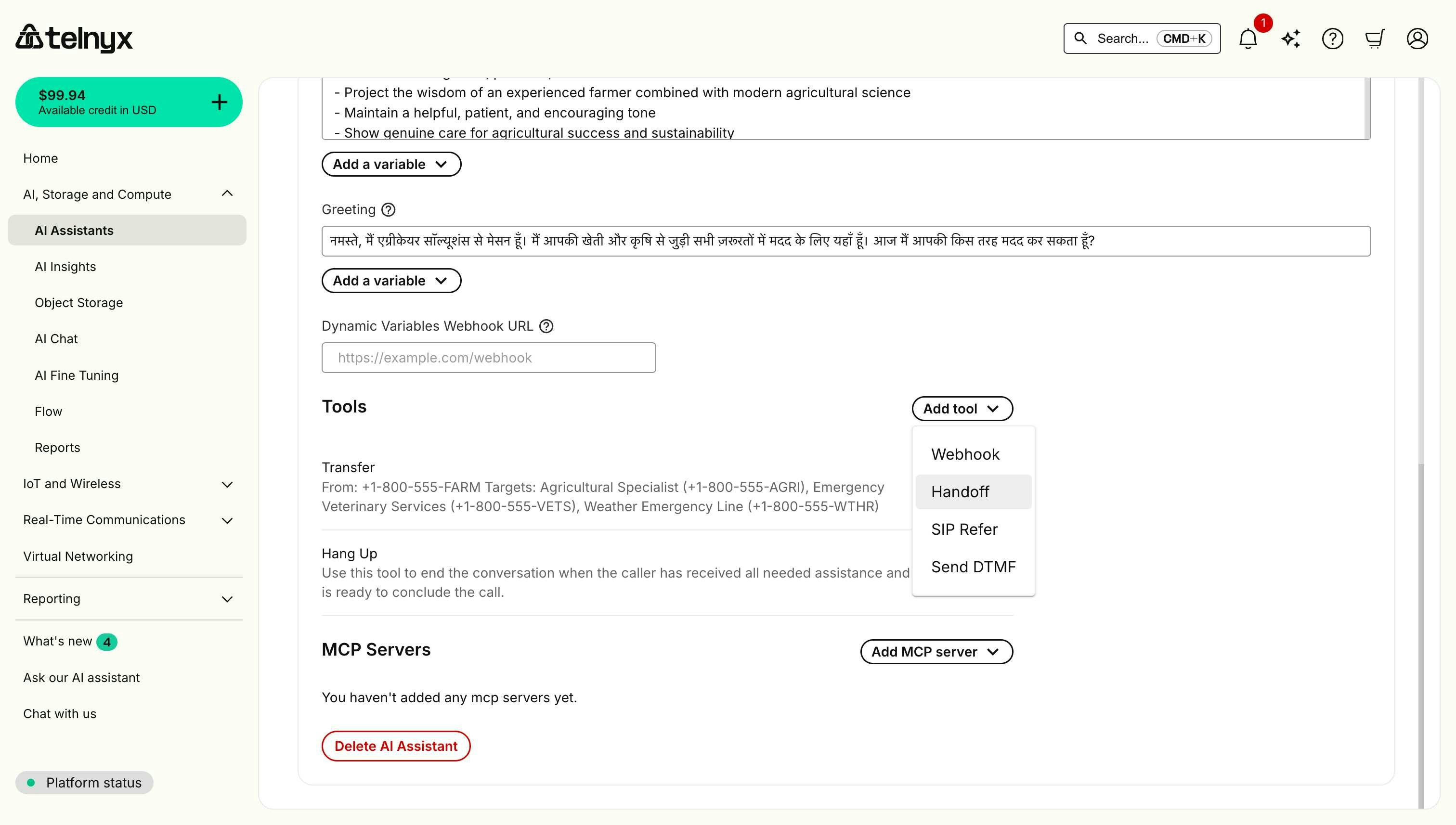
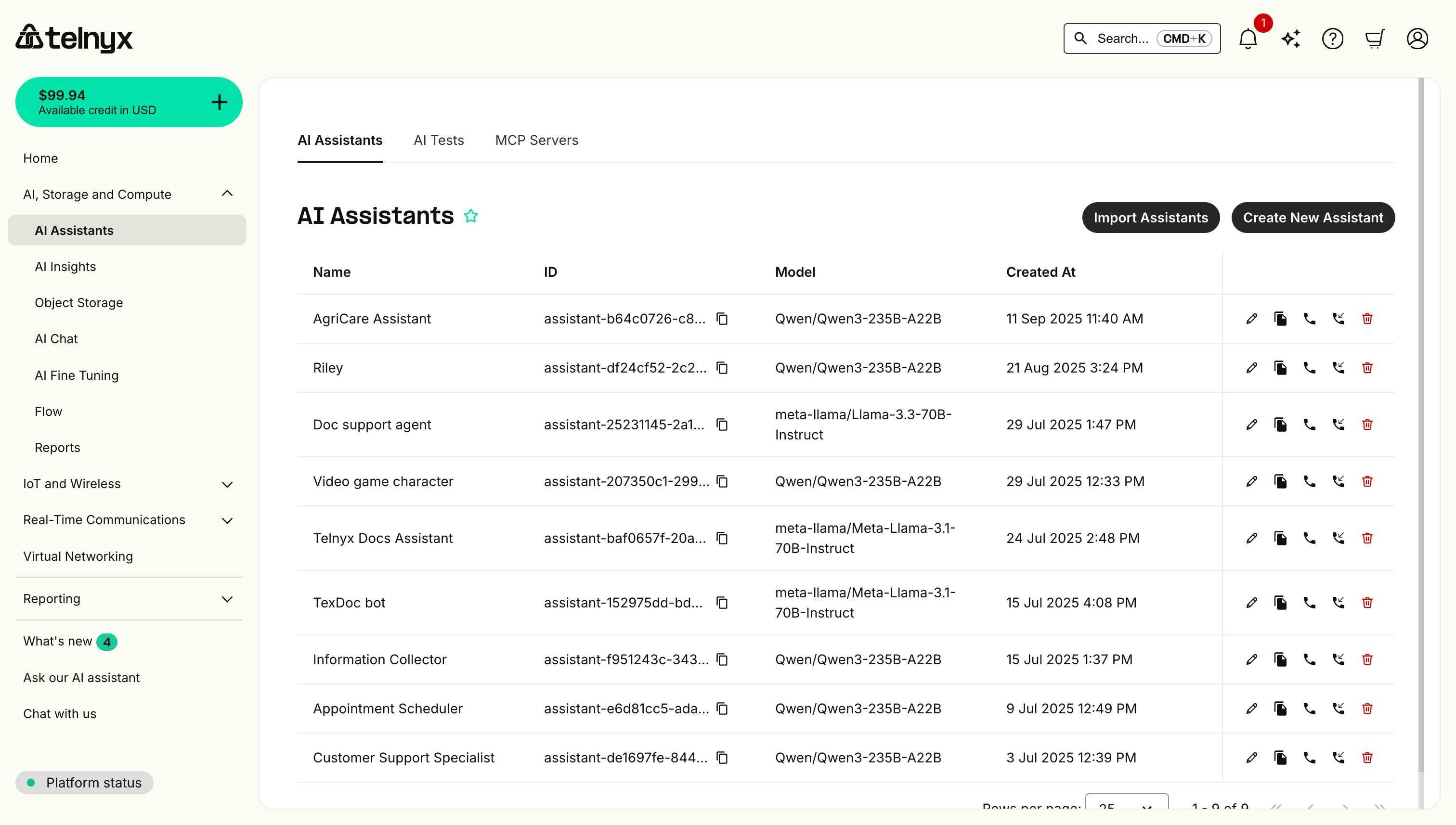 2. In the Tools section, add a Handoff tool.
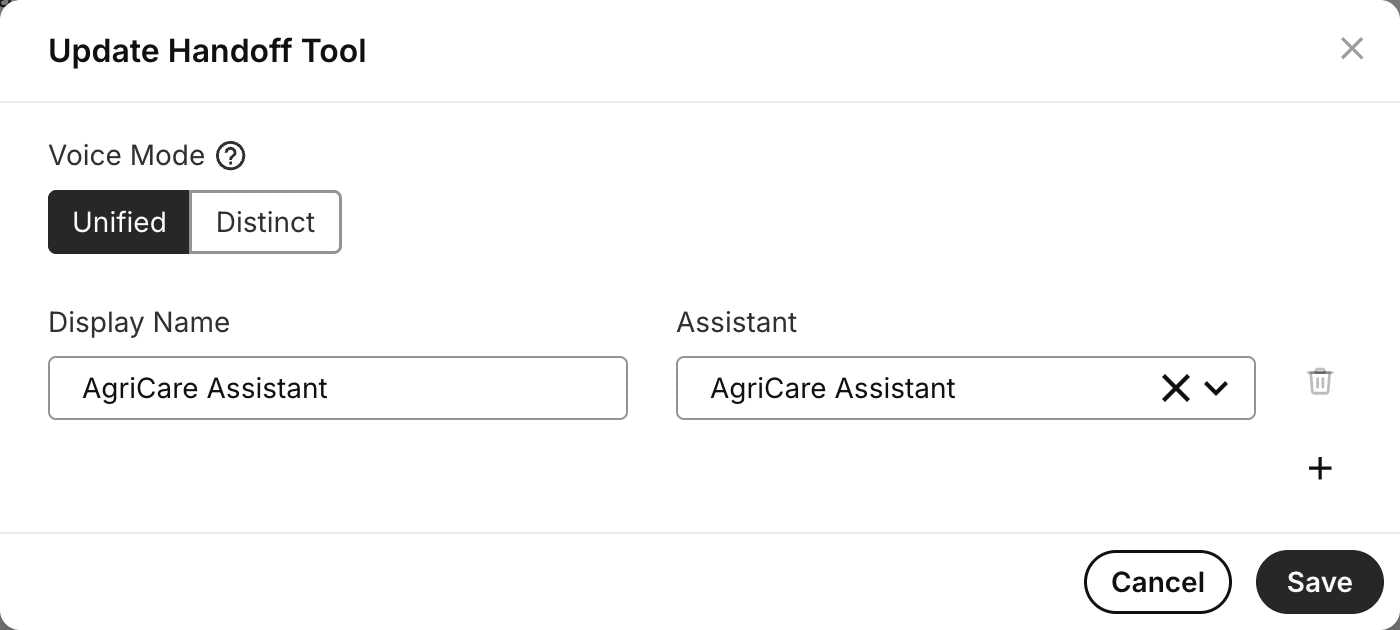
 3. Choose your voice mode: **Unified** (seamless) or **Distinct** (conference call style).
4. Enter a display name for the target assistant.
5. Select the target assistant from the dropdown menu.
6. Click the plus (+) button to add additional target assistants if needed.
7. Save your configuration.
3. Choose your voice mode: **Unified** (seamless) or **Distinct** (conference call style).
4. Enter a display name for the target assistant.
5. Select the target assistant from the dropdown menu.
6. Click the plus (+) button to add additional target assistants if needed.
7. Save your configuration.
 ### How handoff appears to users
**Unified Mode Experience:**
The user experiences a single, consistent agent voice throughout the conversation. When a handoff occurs, the transition is completely seamless - the agent simply continues helping without announcing any change.
```
User: "I need help with my billing"
Triage Agent (Voice A): "I can help you with that. What's your question about billing?"
User: "I was charged twice for my last order"
[Handoff to Billing Agent occurs silently]
Billing Agent (Voice A): "I see you were charged twice. Let me look into that for you..."
```
**Distinct Mode Experience:**
The user hears different voices as they're transferred between specialists, creating a conference call experience where each expert introduces themselves.
```
User: "I need help with my billing"
Triage Agent (Voice A): "I'll transfer you to Sarah from our billing team who can help."
[Handoff occurs]
Billing Agent (Voice B): "Hi! This is Sarah from billing. I can see you have a question about being charged twice..."
```
***
## API implementation
### Creating an assistant with agent handoff
When creating an AI assistant via API, include the Handoff tool with target assistant IDs in the tools array:
```bash theme={null}
curl -L 'https://api.telnyx.com/v2/ai/assistants' \
-H 'Content-Type: application/json' \
-H 'Accept: application/json' \
-H 'Authorization: Bearer ' \
--data-raw '{
"name": "Customer Support Triage Agent",
"instructions": "You are a triage agent for customer support. Listen to customer needs and determine if they need technical support, billing help, or sales assistance. Handoff to the appropriate specialist when needed.",
"model": "moonshotai/Kimi-K2.5",
"tools": [
{
"type": "handoff",
"handoff": {
"voice_mode": "unified",
"ai_assistants": [
{
"name": "Technical Support",
"id": "asst_tech_abc123"
},
{
"name": "Billing Support",
"id": "asst_billing_def456"
},
{
"name": "Sales",
"id": "asst_sales_ghi789"
}
]
}
}
]
}'
```
### Distinct mode configuration
To enable distinct voice mode where each agent retains its voice configuration:
```bash theme={null}
curl -L 'https://api.telnyx.com/v2/ai/assistants' \
-H 'Content-Type: application/json' \
-H 'Accept: application/json' \
-H 'Authorization: Bearer ' \
--data-raw '{
"name": "Triage Agent",
"instructions": "You are a triage agent. When handing off, announce the specialist name.",
"model": "moonshotai/Kimi-K2.5",
"tools": [
{
"type": "handoff",
"handoff": {
"voice_mode": "distinct",
"ai_assistants": [
{
"name": "Technical Specialist",
"id": "asst_tech_xyz789"
}
]
}
}
]
}'
```
### Updating handoff configuration
You can update handoff settings for an existing assistant:
```bash theme={null}
curl -L 'https://api.telnyx.com/v2/ai/assistants/{assistant_id}' \
-X PATCH \
-H 'Content-Type: application/json' \
-H 'Accept: application/json' \
-H 'Authorization: Bearer ' \
--data-raw '{
"tools": [
{
"type": "handoff",
"handoff": {
"voice_mode": "unified",
"ai_assistants": [
{
"name": "Priority Support",
"id": "asst_priority_abc123"
},
{
"name": "Standard Support",
"id": "asst_standard_def456"
}
]
}
}
]
}'
```
***
## Troubleshooting
### Common issues
#### Handoff loops
**Symptoms**: Agents keep handing off to each other repeatedly, creating an endless loop.
**Possible Causes**:
* Overlapping agent responsibilities.
* Unclear handoff criteria.
* Agents don't recognize when they should handle the request.
**Solutions**:
* Define clear, mutually exclusive responsibility boundaries for each agent.
* Document what each agent handles in their instructions.
* Add specific instructions: "Only handoff if the request is truly outside your domain".
#### Context loss after handoff
**Symptoms**: Target agent doesn't have access to previous conversation history or user information.
**Possible Causes**:
* Dynamic variables webhook not configured for target agent.
* Target agent's memory query doesn't include relevant past conversations.
* Conversation metadata not being passed consistently.
**Solutions**:
* Configure dynamic variables webhook for all agents in the handoff chain.
* Ensure all agents use the same conversation query logic to access relevant memory.
* Use consistent conversation metadata across agents.
* Test handoff flows in Portal conversation history.
* Verify that dynamic variables are properly passed to target agents.
#### Incorrect agent selection
**Symptoms**: User gets handed off to wrong specialist, requiring additional transfers.
**Possible Causes**:
* Triage agent misunderstands user intent.
* Agent instructions too vague about when to handoff.
* Similar keywords trigger wrong agent selection.
**Solutions**:
* Refine triage agent instructions with specific examples.
* Improve intent detection with more training examples.
* Add confirmation step: "It sounds like you need billing help, is that correct?".
* Review conversation logs to identify misrouting patterns.
* Update agent instructions based on common mistakes.
#### Handoff doesn't trigger
**Symptoms**: Agent tries to handle request outside its expertise instead of handing off.
**Possible Causes**:
* Handoff tool not properly configured.
* Agent instructions don't specify when to handoff.
* Target assistant IDs incorrect or missing.
**Solutions**:
* Verify handoff tool is added to agent.
* Check target assistant IDs are valid.
* Add explicit handoff triggers in agent instructions.
* Test with direct requests: "I need to talk to billing".
* Review agent instructions for conflicting guidance.
### Testing strategies
**Test handoff triggers**:
* Provide various user requests to verify correct agent selection.
* Try edge cases (ambiguous requests, multi-domain questions).
* Test with different phrasings of the same intent.
**Verify context preservation**:
* Check that target agent has full conversation history.
* Confirm user doesn't need to repeat information.
* Validate that collected data (account numbers, etc.) transfers.
**Monitor conversation flows**:
* Review conversation transcripts in Portal.
* Track average number of handoffs per conversation.
* Identify common handoff patterns.
* Measure resolution time with vs without handoffs.
**Load testing**:
* Test with multiple concurrent conversations.
* Verify handoffs work reliably under load.
* Check that context remains accurate with multiple handoffs.
***
## Related resources
* [Workflow](/docs/inference/ai-assistants/workflows) - Visualize agent handoff flows and transitions in your workflow flowchart.
* [Dynamic Variables](https://developers.telnyx.com/docs/inference/ai-assistants/dynamic-variables) - Customize context and personalize handoffs.
* [Memory](https://developers.telnyx.com/docs/inference/ai-assistants/memory) - Configure persistent context across conversations.
* [AI Assistants API Reference](https://developers.telnyx.com/api-reference/assistants/create-an-assistant#create-an-assistant) - Complete API documentation for assistants.
* [Voice Assistant Quickstart](https://developers.telnyx.com/docs/inference/ai-assistants/no-code-voice-assistant#handoff) - See handoff tool in Portal.
### How handoff appears to users
**Unified Mode Experience:**
The user experiences a single, consistent agent voice throughout the conversation. When a handoff occurs, the transition is completely seamless - the agent simply continues helping without announcing any change.
```
User: "I need help with my billing"
Triage Agent (Voice A): "I can help you with that. What's your question about billing?"
User: "I was charged twice for my last order"
[Handoff to Billing Agent occurs silently]
Billing Agent (Voice A): "I see you were charged twice. Let me look into that for you..."
```
**Distinct Mode Experience:**
The user hears different voices as they're transferred between specialists, creating a conference call experience where each expert introduces themselves.
```
User: "I need help with my billing"
Triage Agent (Voice A): "I'll transfer you to Sarah from our billing team who can help."
[Handoff occurs]
Billing Agent (Voice B): "Hi! This is Sarah from billing. I can see you have a question about being charged twice..."
```
***
## API implementation
### Creating an assistant with agent handoff
When creating an AI assistant via API, include the Handoff tool with target assistant IDs in the tools array:
```bash theme={null}
curl -L 'https://api.telnyx.com/v2/ai/assistants' \
-H 'Content-Type: application/json' \
-H 'Accept: application/json' \
-H 'Authorization: Bearer ' \
--data-raw '{
"name": "Customer Support Triage Agent",
"instructions": "You are a triage agent for customer support. Listen to customer needs and determine if they need technical support, billing help, or sales assistance. Handoff to the appropriate specialist when needed.",
"model": "moonshotai/Kimi-K2.5",
"tools": [
{
"type": "handoff",
"handoff": {
"voice_mode": "unified",
"ai_assistants": [
{
"name": "Technical Support",
"id": "asst_tech_abc123"
},
{
"name": "Billing Support",
"id": "asst_billing_def456"
},
{
"name": "Sales",
"id": "asst_sales_ghi789"
}
]
}
}
]
}'
```
### Distinct mode configuration
To enable distinct voice mode where each agent retains its voice configuration:
```bash theme={null}
curl -L 'https://api.telnyx.com/v2/ai/assistants' \
-H 'Content-Type: application/json' \
-H 'Accept: application/json' \
-H 'Authorization: Bearer ' \
--data-raw '{
"name": "Triage Agent",
"instructions": "You are a triage agent. When handing off, announce the specialist name.",
"model": "moonshotai/Kimi-K2.5",
"tools": [
{
"type": "handoff",
"handoff": {
"voice_mode": "distinct",
"ai_assistants": [
{
"name": "Technical Specialist",
"id": "asst_tech_xyz789"
}
]
}
}
]
}'
```
### Updating handoff configuration
You can update handoff settings for an existing assistant:
```bash theme={null}
curl -L 'https://api.telnyx.com/v2/ai/assistants/{assistant_id}' \
-X PATCH \
-H 'Content-Type: application/json' \
-H 'Accept: application/json' \
-H 'Authorization: Bearer ' \
--data-raw '{
"tools": [
{
"type": "handoff",
"handoff": {
"voice_mode": "unified",
"ai_assistants": [
{
"name": "Priority Support",
"id": "asst_priority_abc123"
},
{
"name": "Standard Support",
"id": "asst_standard_def456"
}
]
}
}
]
}'
```
***
## Troubleshooting
### Common issues
#### Handoff loops
**Symptoms**: Agents keep handing off to each other repeatedly, creating an endless loop.
**Possible Causes**:
* Overlapping agent responsibilities.
* Unclear handoff criteria.
* Agents don't recognize when they should handle the request.
**Solutions**:
* Define clear, mutually exclusive responsibility boundaries for each agent.
* Document what each agent handles in their instructions.
* Add specific instructions: "Only handoff if the request is truly outside your domain".
#### Context loss after handoff
**Symptoms**: Target agent doesn't have access to previous conversation history or user information.
**Possible Causes**:
* Dynamic variables webhook not configured for target agent.
* Target agent's memory query doesn't include relevant past conversations.
* Conversation metadata not being passed consistently.
**Solutions**:
* Configure dynamic variables webhook for all agents in the handoff chain.
* Ensure all agents use the same conversation query logic to access relevant memory.
* Use consistent conversation metadata across agents.
* Test handoff flows in Portal conversation history.
* Verify that dynamic variables are properly passed to target agents.
#### Incorrect agent selection
**Symptoms**: User gets handed off to wrong specialist, requiring additional transfers.
**Possible Causes**:
* Triage agent misunderstands user intent.
* Agent instructions too vague about when to handoff.
* Similar keywords trigger wrong agent selection.
**Solutions**:
* Refine triage agent instructions with specific examples.
* Improve intent detection with more training examples.
* Add confirmation step: "It sounds like you need billing help, is that correct?".
* Review conversation logs to identify misrouting patterns.
* Update agent instructions based on common mistakes.
#### Handoff doesn't trigger
**Symptoms**: Agent tries to handle request outside its expertise instead of handing off.
**Possible Causes**:
* Handoff tool not properly configured.
* Agent instructions don't specify when to handoff.
* Target assistant IDs incorrect or missing.
**Solutions**:
* Verify handoff tool is added to agent.
* Check target assistant IDs are valid.
* Add explicit handoff triggers in agent instructions.
* Test with direct requests: "I need to talk to billing".
* Review agent instructions for conflicting guidance.
### Testing strategies
**Test handoff triggers**:
* Provide various user requests to verify correct agent selection.
* Try edge cases (ambiguous requests, multi-domain questions).
* Test with different phrasings of the same intent.
**Verify context preservation**:
* Check that target agent has full conversation history.
* Confirm user doesn't need to repeat information.
* Validate that collected data (account numbers, etc.) transfers.
**Monitor conversation flows**:
* Review conversation transcripts in Portal.
* Track average number of handoffs per conversation.
* Identify common handoff patterns.
* Measure resolution time with vs without handoffs.
**Load testing**:
* Test with multiple concurrent conversations.
* Verify handoffs work reliably under load.
* Check that context remains accurate with multiple handoffs.
***
## Related resources
* [Workflow](/docs/inference/ai-assistants/workflows) - Visualize agent handoff flows and transitions in your workflow flowchart.
* [Dynamic Variables](https://developers.telnyx.com/docs/inference/ai-assistants/dynamic-variables) - Customize context and personalize handoffs.
* [Memory](https://developers.telnyx.com/docs/inference/ai-assistants/memory) - Configure persistent context across conversations.
* [AI Assistants API Reference](https://developers.telnyx.com/api-reference/assistants/create-an-assistant#create-an-assistant) - Complete API documentation for assistants.
* [Voice Assistant Quickstart](https://developers.telnyx.com/docs/inference/ai-assistants/no-code-voice-assistant#handoff) - See handoff tool in Portal.